Posted: Thu May 10, 2007 1:13 pm Post subject:
A Graphical Question
How do I direct my new unit into a new voxel? I tried doing the following scrits:
Rules.in:
Code:
; Scout,
[SCOT]
Image=SCOT
UIName=Name:SCOT
Name=Scout
Category=AirPower
Prerequisite=GAWEAP,RADAR
Primary=
Secondary=
NavalTargeting=6
Strength=50
SuppressionThreshold=5; damage below this amount won't suppress the parasite
ReselectIfLimboed=yes ; If selected when limbo on attack of infantry, reselect when unlimbo
DefaultToGuardArea=no ; the much awaited terror drone default to move and attack when resting
Armor=special_1
TechLevel=1
Turret=no
IsTilter=no
CrateGoodie=no
Sight=7
Speed=15 ; gs Don't go higher than 20, or he gets stuck running in circles
Owner=British,French,Germans,Americans,Alliance
Cost=400
Points=20
ROT=40
AllowedToStartInMultiplayer=no
Crusher=no
Crewed=no
IsSelectableCombatant=yes
Explosion=TWLT070,S_BANG48,S_BRNL58,S_CLSN58,S_TUMU60
VoiceSelect=TerrorDroneSelect
VoiceAttack=TerrorDroneAttackCommand
VoiceMove=TerrorDroneMove
VoiceFeedback=
DieSound=TerrorDroneDie
MoveSound=TerrorDroneMoveLoop
MaxDebris=2
Locomotor={4A582741-9839-11d1-B709-00A024DDAFD1};<drive>{55D141B8-DB94-11d1-AC98-006008055BB5}
MovementZone=Destroyer
ThreatPosed=25 ; This value MUST be 0 for all building addons
DamageParticleSystems=SparkSys,SmallGreySSys
Weight=.5
ImmuneToPsionics=yes
ImmuneToRadiation=yes
Parasiteable=no
Trainable=no
Explodes=no
AccelerationFactor=5 ; really fast
DeaccelerationFactor=5 ; This is TS's mizspelingg knot min
ZFudgeColumn=8
ZFudgeTunnel=13
;Bombable=no
Size=2
Accelerates=false
I also insertd my voxel into local.mix. When I start a game, the game freezes at the loadng screen at about 25%. Any idea what I'm doing wrong? QUICK_EDIT
Joined: 22 Aug 2006 Location: somewhere south of the north pole
Posted: Thu May 10, 2007 2:09 pm Post subject:
Four things:
1. Check that it is listed it at [VehicleTypes] in rules.ini
2. Don't list things like "Primary=" and "Secondary=" if they aren't used
3. Dont use "special_1" or "special_2" as armor, use the STANDAR "Light","Medium" and "Heavy"
4. Don't think you need "PrimaryFireFLH" since it doesn't have a weapon
Have a good day.
(Don't anyone read the tut's anymore ) _________________ This is a signature QUICK_EDIT
Elite, units can be either voxels or shps, Terror Drone which you cloned this from was a shp, but you are talking about a voxel. A voxel requires a same-named hva file and doesn't need some of the code that a shp does, and a different locomotor (the one that other ground voxels use will work fine in this case). QUICK_EDIT
Joined: 25 Sep 2006 Location: Teamblackistan Posts: Over 9000
Posted: Thu May 10, 2007 11:36 pm Post subject:
You can only use the colors that are in the TS PAllette (the ones listed in the voxel editor)
IF you us MS paint to do your texture, MAKE SURE YOU USE THE RIGHT COLORS!!
if you don't then the game won't recognize them and it'll look like crap~
an hva is basically just a file that tells the game how to use the voxel.
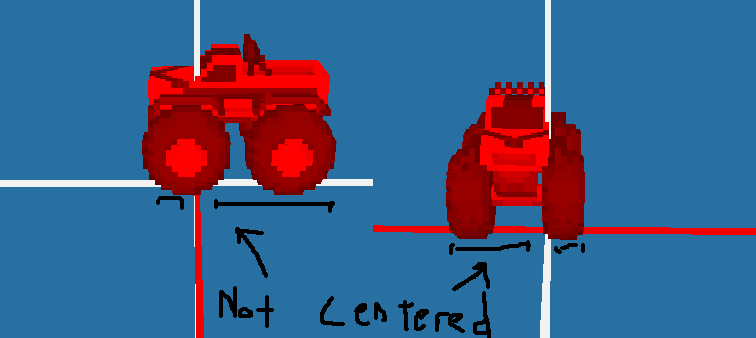
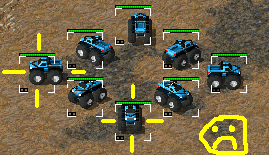
If you don't have one, the game will freeze while it's loading. What you need is hva builder, to make one of your own. You can use that program to llign the voxel corretly, so tthat the selection box isn't off-kilter (see below)
but that's all I'll say for now. Be sure to give the tutorials forum a look, there's some good ones in there, very helpful
You cannot post new topics in this forum You cannot reply to topics in this forum You cannot edit your posts in this forum You cannot delete your posts in this forum You cannot vote in polls in this forum You cannot attach files in this forum You can download files in this forum


 A Graphical Question


 )