Project Perfect Mod Forums
:: Home :: Get Hosted :: PPM FAQ :: Forum FAQ :: Privacy Policy :: Search :: Memberlist :: Usergroups :: Register :: Profile :: Log in to check your private messages :: Log in ::


The time now is Mon May 25, 2026 3:16 am
All times are UTC + 0
Question: about tmp editor
Moderators: Global Moderators, Media Hut Moderators, Red Alert 2 Moderators, Tiberian Sun Moderators
Post new topic   Reply to topic Page 1 of 1 [5 Posts] Mark the topic unread ::  View previous topic :: View next topic
Author Message
Tony
Commander


Joined: 02 Apr 2005
Location: United States

PostPosted: Mon Jan 19, 2009 2:24 am    Post subject:  Question: about tmp editor
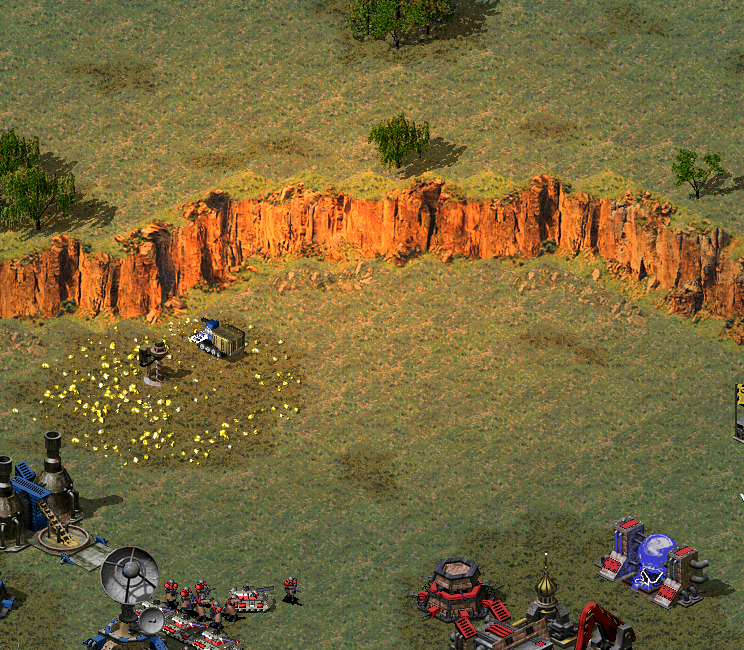
Subject description: My first crappy attempt at terrain
Reply with quote  Mark this post and the followings unread

I have started modifying the temperate terrain in ra2 for the first time and have come to a brick wall.

in tmp editor 1.05 how do i import my new image to a rmpfx tileset or slope

I tried all the options that seem to be the answer but the tmp image in the editor does not change

>This is what i have so far, just a hue and saturation tweak in photoshop for now.. nothing special but I like it and I do plan to completely rework the cliffs eventually Smile


Untitled-2.png
 Description:
 Filesize:  918.41 KB
 Viewed:  2069 Time(s)

Untitled-2.png


Back to top
View user's profile Send private message Skype Account
Aro
Alcohol Fueled


Joined: 10 Sep 2006

PostPosted: Mon Jan 19, 2009 2:59 am    Post subject: Reply with quote  Mark this post and the followings unread

What I do is use the Westwood terrain as a template. When you've made your new terrain tile, highlight the entire list on the left hand side and then right click and hit 'Paste all complete'. That's how I make my terrain anyway.

Back to top
View user's profile Send private message
Tony
Commander


Joined: 02 Apr 2005
Location: United States

PostPosted: Mon Jan 19, 2009 7:03 am    Post subject: Reply with quote  Mark this post and the followings unread

I did exactly that with no change, and the changes I made to the png's should be very noticeable.

Opened modified png in paint > select all > Copy > switched to tmp editor > highlight all > Paste > Complete ( I did not see 'Paste all complete')

Back to top
View user's profile Send private message Skype Account
Aro
Alcohol Fueled


Joined: 10 Sep 2006

PostPosted: Mon Jan 19, 2009 11:22 am    Post subject: Reply with quote  Mark this post and the followings unread

Paste > Complete is right, my mistake.
If this isn't working for you then there must be something wrong with the .PNG, remember it has to be EXACTLY the same shape as the one with the .TMP.

Back to top
View user's profile Send private message
Tony
Commander


Joined: 02 Apr 2005
Location: United States

PostPosted: Tue Jan 20, 2009 2:45 am    Post subject: Reply with quote  Mark this post and the followings unread

Thanks, issue resolved.

Back to top
View user's profile Send private message Skype Account
Display posts from previous:   
Post new topic   Reply to topic Page 1 of 1 [5 Posts] Mark the topic unread ::  View previous topic :: View next topic
 
Share on TwitterShare on FacebookShare on Google+Share on DiggShare on RedditShare on PInterestShare on Del.icio.usShare on Stumble Upon
You cannot post new topics in this forum
You cannot reply to topics in this forum
You cannot edit your posts in this forum
You cannot delete your posts in this forum
You cannot vote in polls in this forum
You cannot attach files in this forum
You can download files in this forum


Powered by phpBB © phpBB Group

[ Time: 0.1631s ][ Queries: 14 (0.0094s) ][ Debug on ]