Posted: Sun Feb 22, 2009 8:50 am Post subject:
Spawning debris from animations
Subject description: and lots of other questions ;)
hi guys,
although i just registerd here, im not completely new to modding CnC games. however, there are a few things i havent been able to figure out myself and i want to ask the professionals about ^^
first thing: how do i spawn debris from normal animations? as it is possible with meteors, there should be a way to do it, but i cant find it.
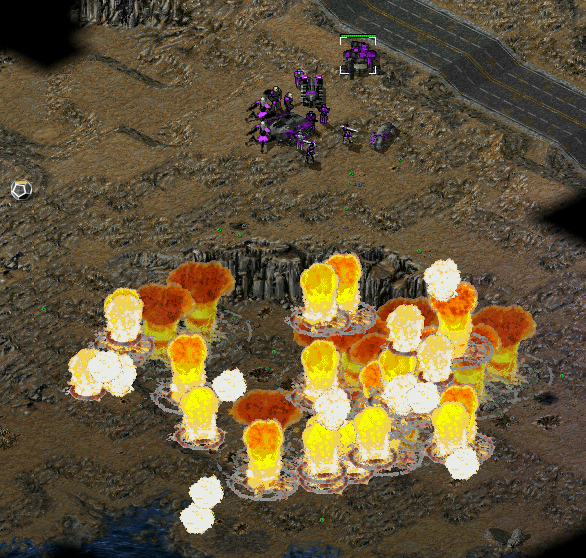
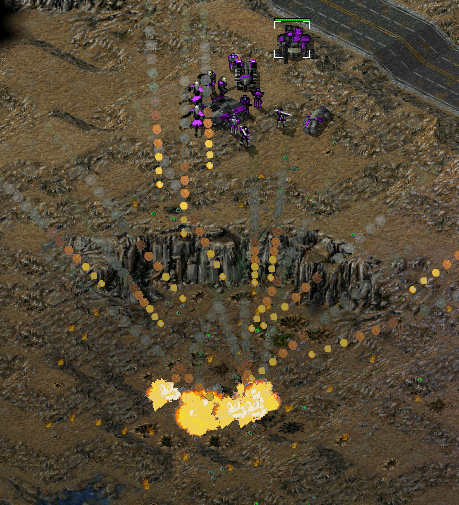
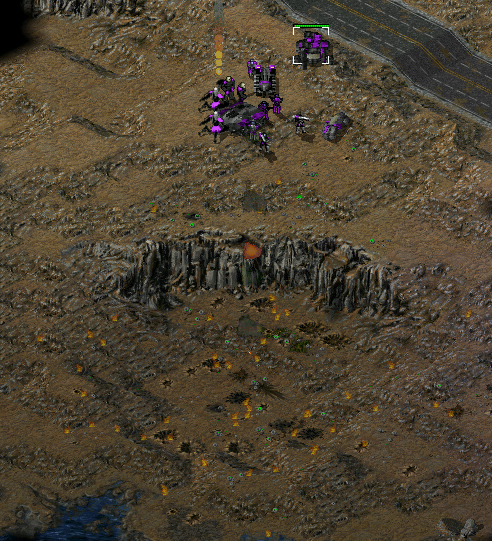
i want to create something like a orbital strike SW similar to the viron orbital cannons from ground control II (if anybody has played it).
at first, an invisible cluster missile will be launched and explode over the target. each cluster will have some sort of ion beam as explosion animation. after 2-3 seconds, the beam will collapse and the main explosion takes place. this is where i have the problem: to simulate area damage, i want to use debris. however, i cant get my big explosion anim to spawn them. help please?
the other thing is that i want to redo all the cameos in a special style with some stats and other things shown in the cameo itself. to do that, however, i have to disable the sidebar text as it covers up important things on the cameo. how can this be done? if i remember correctly, i have already seen something like this.
thanks for your help and greetings from germany QUICK_EDIT
unfortunately is the art.ini debris logic part of the mod TI, so i won't make it public how it works. But with the Meteor logic you are already on the right way. Just play around with the keys and remove one or two while testing. The art.ini debris are nothing else than meteors which don't fall from the sky.
(hint: in the end only 6 keys in your animation are really necessary to make an art.ini debris work)
The sidemenu text can be disabled in the options menu.
Im Menü "Spielsteuerung" ist der button "Seitenmenü-Untertitel". Den einfach deaktivieren dann ist der cameo-text weg. _________________ SHP Artist of Twisted Insurrection: Nod buildings
thanks for your help, i really forgot to look into the option menu.
regarding the debris: again, thanks for the hint. i might be albe to figure something out. but for now i decided to use particles. and thats the new problem:
if i use an animation with Warhead=ParticleSpawningWarhead, it does not spawn the particles ingame. if i, however, use
it works. so far so good, but i need the animation that plays before the explosion to play at full lenght.
i tried a workaround with
Code:
[BeamFromTheSky]
.
.
.
Next=DUMMYANIM
and so on, but that also does not work.
all in all: the particles only spawn, when the animation is called directly by ExpireAnim=. what am i doing wrong here? must be some simple thing, but i dont understand it. QUICK_EDIT
This is largely because WW has complete rubbish coding for animations it's so bugged and useless it's not even funny. Also, "the art.ini debris logic" is not part of TI for god's sake, TSTW, TSD and TO (just to name a few) have been using this for years >_>, some of it is out there in public, you can even find it in some tutorials on PPM afaik.
dont.shoot, paste some more code here, I know how you can fix this, but you're not really making clear in what order you want things to happen. QUICK_EDIT
so actually you have 2 different problems
a: the particlesystem doesn't work on the warhead
b: the 2 anims don't play at the same time, but after each other
to a:
your warhead should have the key
Particle=ParticleSystem
AnimList=explosion
Then it should play at the same time the explosion and start the particlesystem
to b:
it's a bit more complicated to play 2 anims at the same time. ExpireAnim and Next start only when the anim is finish.
To make this work you have to use a working art.ini debris (the first problem you have to solve )
then give this debris a very short duration (it should fly only for a second or less)
then you can create one explosion with ExpireAnim and the other one with Spawns by using a second debris which has only a short lifetime too.
e.g.
[Explosion1]
ExpireAnim=TWLT100
Spawns=Explosion2 ;start the other debris which flies only for a second too
[Explosion2] ;must be an art.ini debris too
ExpireAnim=S_BRNL58
@Titan
all these mods are afaik not public yet or don't allow access to the inis. So afaik is the art.ini debris code still mod-exclusive. _________________ SHP Artist of Twisted Insurrection: Nod buildings
sorry, my bad. i didnt make my point clear enough.
here is the complete code as it is at the moment:
Code:
[ORBITAL_INIT] ;this is the initial beam that collapses after a few seconds
Image=ORBITALBEAM
LoopStart=0
LoopCount=100
LoopEnd=2
Next=ORBITALSTRIKE
Translucent=yes
Tiled=yes
TranslucencyDetailLevel=1
Report=ION1
UseNormalLight=yes
Damage=10
DamageRadius=10
Warhead=SUPER
[ORBITALSTRIKE] ;this is the animation that is to be played after the beam collaped
Damage=50
DamageRadius=512
Warhead=SUPER
RandomRate=520,600
DetailLevel=0
Bouncer=yes
Next=ORBITAL_EXPL
Rate=50
[ORBITAL_EXPL] ;thats the main explosion, dealing the damage and spawning the particle sys
Elasticity=0.0
MaxXYVel=0.5
MinZVel=0.5
Damage=5000
DamageRadius=512
Warhead=ORBITALWH ;this warhead has the area-damage particle sys attatched to it
RandomRate=520,600
DetailLevel=0
Bouncer=yes
Rate=50
with this, all animations are played in the correct order, but the particles do not appear.
/edit: forgot to mention, that the particle sys does work. for example, if i add it to any normal weapon, everything works as it should. QUICK_EDIT
give ORBITAL_EXPL the key ExpireAnim with a working explosion and check if ORBITAL_EXPL is played at all.
If i'm not mistaken is it not possible to start a debris with the next key.
means ORBITALSTRIKE doesn't starts ORBITAL_EXPL
You can only spawn animation debris using ExpireAnim= and Spawns=. Next= only works with animation overlay (normal animations). That's why your first animation needs to be debris (with little or no movement at all) If it isn't, you're not going to be able to squeeze it in later. It's one of the biggest annoyances here: Animation debris can spawn both debris and overlay, but overlay can only spawn other overlay, no debris.
Apparently the particle key from the warhead isn't read on animation overlay, that's why you haven't been able to use Next= to get it to work. You cannot put ExpireAnim= or Spawns= on animation debris afaik, but I'm not sure, since I haven't had TS installed for a while. QUICK_EDIT
ok, i used edited debris for ORBITAL_INIT and ORBITALSTRIKE. if linked with ExpireAnim= everything works fine exept the fact, that the animations are played so damn fast, that they are barely visible. im not sure if the whole anim is being played or only the first frames, in any case, messing with Rate= didnt give any results.
which key do i have to change to make the anims play longer?
im sorry, but i am just pretty new to all this debri and particle stuff QUICK_EDIT
that's the problem that you use the image of the anim for the image of the flying debris. And since the debris stay only for less than a second, the anim isn't fully played.
You have to separate the animation from the debris, by playing the anim using the ExpireAnim key and using Spawns to start the other debris.
The debris itself should be only used as dummys to help you play the anims and do the damage.
[ORBITAL_INIT_DEBRIS]
Image=none ;the debris should be invisible and don't have the image of the anim
ExpireAnim=ORBITAL_INIT ;the actually played animation
Spawns=ORBITALSTRIKE ;the other anim that should be played
[ORBITALSTRIKE_DEBRIS]
Image=none ;the debris should be invisible and don't have the image of the anim
ExpireAnim=ORBITALSTRIKE
ORBITALSTRIKE and ORBITAL_INIT are just an anim with the correct rate and loop settings.
now you have to play with the debris flight duration to make the second debris start when the first has finished playing the anim. To make them exact consecutively played like with the Next key is not possible. _________________ SHP Artist of Twisted Insurrection: Nod buildings
ok, now some questions to the debris logic itselft^^
the main problem ist the SpawnCount= tag. if i set it to 1, sometimes no debris are spawned, sometimes even 2-3. how do i set it to spawning exactly one debri? and if that is impossible, is there a workaround?
the other thing is a question about MinZVel=. if this only defines the smallest possible velocity, how do i set the maximum velocity? i didnt find the tag MaxZVel= anywhere.
/edit: what does the tag RandomRate= do? QUICK_EDIT
i know how to spawn and correctly link the debris, my problem is the spawn count and the velocity. i havent found a way yet to fix those two things to a certain value. both, count as well as velocity are chosen rather randomly by the game and i need always the the same values and behavior.
all animations are working fine, but the timing is a little bit complicatet if the velocity of the debris isnt constant. is there any kind of LifeTime= tag or something like that for debris, in which i can define how longe they stay until the ExpireAnim follows? and whats with that buggy SpawnCount= tag? why does it spawn a random number of debris? do we have a way to get the anim spawn exactly one debri?
questions over questions, thanks for your patience. QUICK_EDIT
i know how to spawn and correctly link the debris, my problem is the spawn count and the velocity. i havent found a way yet to fix those two things to a certain value. both, count as well as velocity are chosen rather randomly by the game and i need always the the same values and behavior.
all animations are working fine, but the timing is a little bit complicatet if the velocity of the debris isnt constant. is there any kind of LifeTime= tag or something like that for debris, in which i can define how longe they stay until the ExpireAnim follows? and whats with that buggy SpawnCount= tag? why does it spawn a random number of debris? do we have a way to get the anim spawn exactly one debri?
questions over questions, thanks for your patience.
That's what I meant with animation code being severely fuggled up. There are no workarounds for what you want, ExpireAnim is the only way to be absolutely sure one instance of the selected animation plays. I don't have a TS executable on my laptop, so I can't open it up with a hex editor to check for this "MaxZVel" tag... I don't remember it, so it probably doesn't exist. I'm sorry, but WW simply raped the animation coding, it makes no sense whatsoever and people like us simply discovered all there was to it through trial and error. QUICK_EDIT
ok, then ill try to do something with particles. maybe i can spawn an anim via the particle sys that has a set lifetime and uses an expire anim to call up the next stage. this means replacing debris with particles as i can set the lifetime of them and also the number of spawns. however, i have no clue how to actually do that, so this might take some time^^ *looksupinicodeofothermods*
at last, an other question: i noticed the game becoming *really* slow when building a building. as soon as the construction is complete, the game speeds up again. as i played some other mods some time ago, this did not happen. what causes this behavior and how do i fix it?
You cannot post new topics in this forum You cannot reply to topics in this forum You cannot edit your posts in this forum You cannot delete your posts in this forum You cannot vote in polls in this forum You cannot attach files in this forum You can download files in this forum


 Spawning debris from animations