Project Perfect Mod Forums
:: Home :: Get Hosted :: PPM FAQ :: Forum FAQ :: Privacy Policy :: Search :: Memberlist :: Usergroups :: Register :: Profile :: Log in to check your private messages :: Log in ::


The time now is Sat Apr 04, 2026 2:11 pm
All times are UTC + 0
screen locations?
Moderators: Global Moderators, Red Alert 2 Moderators
Post new topic   Reply to topic Page 1 of 1 [12 Posts] Mark the topic unread ::  View previous topic :: View next topic
Author Message
crevio
Commander


Joined: 19 Apr 2009

PostPosted: Tue Oct 13, 2009 10:19 pm    Post subject:  screen locations? Reply with quote  Mark this post and the followings unread

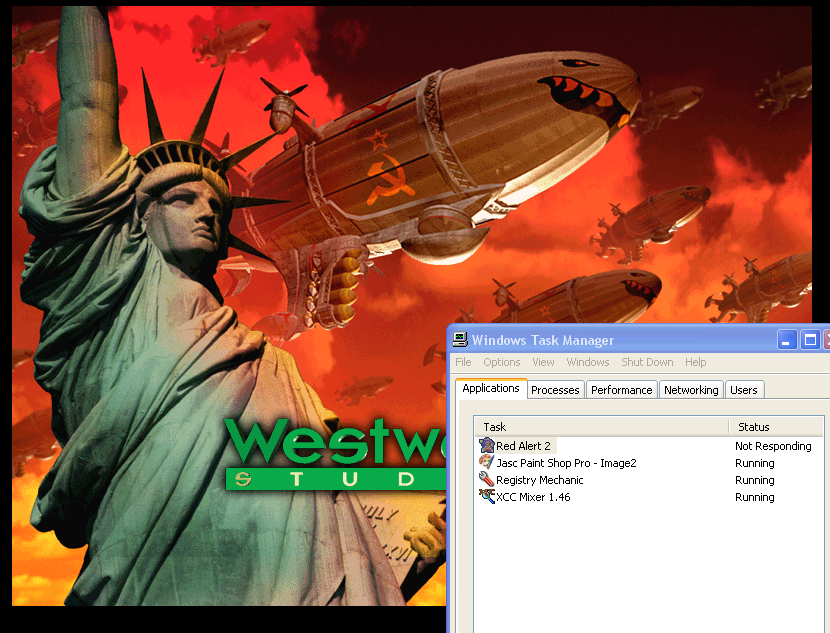
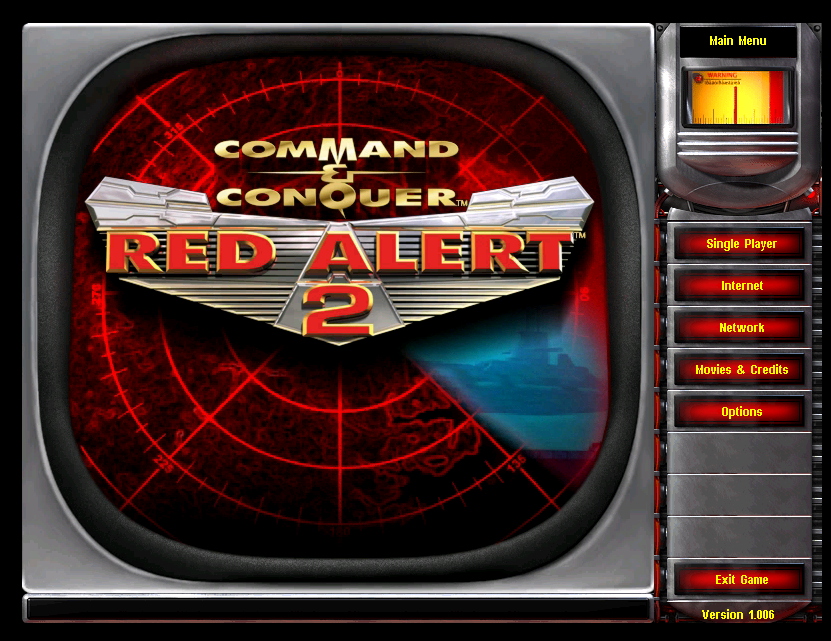
anybody know where these are located? I've looked and looked, but cant seem to find them..


Image2.png
 Description:
 Filesize:  273.31 KB
 Viewed:  2568 Time(s)

Image2.png


Image3.png
 Description:
 Filesize:  346.99 KB
 Viewed:  2568 Time(s)

Image3.png


Image4.png
 Description:
 Filesize:  328.27 KB
 Viewed:  2568 Time(s)

Image4.png


Image5.png
 Description:
 Filesize:  103.62 KB
 Viewed:  2568 Time(s)

Image5.png


Back to top
View user's profile Send private message
Darkstorm
Commander


Joined: 20 Jan 2008
Location: Texas

PostPosted: Tue Oct 13, 2009 10:34 pm    Post subject: Reply with quote  Mark this post and the followings unread

Last two are movies, you would need RAD (I think) Bink Utilities or something like that to edit them.

Second in Local.mix in RA2.mix called glsl.shp

Can't find first, someone that has edited those could tell you but not me.

Back to top
View user's profile Send private message ModDB Profile ID
CCHyper
Defense Minister


Joined: 07 Apr 2005

PostPosted: Tue Oct 13, 2009 11:47 pm    Post subject: Reply with quote  Mark this post and the followings unread

Isn't the first the YR version of the menu animation BIK video?

Back to top
View user's profile Send private message
Dark Templar X
Commander


Joined: 26 Feb 2009

PostPosted: Tue Oct 13, 2009 11:54 pm    Post subject: Reply with quote  Mark this post and the followings unread

Image2 is what appears when you launch the game from a CD and have both games installed. I have no idea what the image is though.

Back to top
View user's profile Send private message
Nikademis Von Hisson
General


Joined: 05 Sep 2007
Location: Wilkes Barre PA

PostPosted: Wed Oct 14, 2009 12:24 am    Post subject: 1st image Reply with quote  Mark this post and the followings unread

the first image is in the ra2 folder. it is a number file, i will get you the name and post back in a few minutes

_________________
I am authorized to send out the TMP Studio, PM ME IF YOU WANT IT And check this out, these were sent to me for help with terrain and zdata help along with TMP Studio/Builder

http://www.ppmsite.com/forum/viewtopic.php?t=27714

Back to top
View user's profile Send private message Send e-mail Skype Account
Nikademis Von Hisson
General


Joined: 05 Sep 2007
Location: Wilkes Barre PA

PostPosted: Wed Oct 14, 2009 12:42 am    Post subject: 1st image Reply with quote  Mark this post and the followings unread

In the RA2 folder look for these files


00000000.256

00000409.016

00000409.256


I think I used ms paint to open it and then us photoshop cs3. back these up because if you do it wrong it looks screwed up. When I get my laptop back I'll get you some more info on it.

_________________
I am authorized to send out the TMP Studio, PM ME IF YOU WANT IT And check this out, these were sent to me for help with terrain and zdata help along with TMP Studio/Builder

http://www.ppmsite.com/forum/viewtopic.php?t=27714

Back to top
View user's profile Send private message Send e-mail Skype Account
OmegaBolt
President


Joined: 21 Mar 2005
Location: York, England

PostPosted: Wed Oct 14, 2009 12:43 am    Post subject: Reply with quote  Mark this post and the followings unread

00000409.(something). Just rename something to bmp and it'll be loadable as a normal image.

Meh, beaten afterall. FOILED AGAIN! #Robot

Back to top
View user's profile Send private message Send e-mail
CCHyper
Defense Minister


Joined: 07 Apr 2005

PostPosted: Wed Oct 14, 2009 1:01 am    Post subject: Reply with quote  Mark this post and the followings unread

I thought he took these from ingame?

But yea, the 265 palette and 16bit images. 409 would be the SKU.

Back to top
View user's profile Send private message
Nikademis Von Hisson
General


Joined: 05 Sep 2007
Location: Wilkes Barre PA

PostPosted: Wed Oct 14, 2009 1:05 am    Post subject: 1st image Reply with quote  Mark this post and the followings unread

when you run the game that image pops up...if you its coming you can take a screen shot of it.


Open it with ms paint......if you want open a program like photoshop. copy the image into that program. Edit it as you see fit them copy it back to ms paint and save it. you dont need to change to bmp format

_________________
I am authorized to send out the TMP Studio, PM ME IF YOU WANT IT And check this out, these were sent to me for help with terrain and zdata help along with TMP Studio/Builder

http://www.ppmsite.com/forum/viewtopic.php?t=27714

Back to top
View user's profile Send private message Send e-mail Skype Account
crevio
Commander


Joined: 19 Apr 2009

PostPosted: Wed Oct 14, 2009 1:44 am    Post subject: Reply with quote  Mark this post and the followings unread

Cool, thanks guys
and thanks for explaining that for me Nikademis Von Hisson.

Got 3 outta the four done. only one left to edit is pic#3. Is this movie located on the disk itself? or is it inside the directory some where?

Edit: Found it, it's the ra2ts_s.bik and ra2s_l.bik files in Language.mix

sweet thanks for your help guys.... Very Happy

Back to top
View user's profile Send private message
Nikademis Von Hisson
General


Joined: 05 Sep 2007
Location: Wilkes Barre PA

PostPosted: Wed Oct 14, 2009 2:07 am    Post subject: 3 Reply with quote  Mark this post and the followings unread

I wish I knew how to make a bik file, i have the program to do it, but no clue after that.

_________________
I am authorized to send out the TMP Studio, PM ME IF YOU WANT IT And check this out, these were sent to me for help with terrain and zdata help along with TMP Studio/Builder

http://www.ppmsite.com/forum/viewtopic.php?t=27714

Back to top
View user's profile Send private message Send e-mail Skype Account
crevio
Commander


Joined: 19 Apr 2009

PostPosted: Wed Oct 14, 2009 2:33 am    Post subject: Reply with quote  Mark this post and the followings unread

thats all you have to do is Bink it, name it the same as the bik file you want replaced, then put it into the ra2 directory

Also you can convert a ra2 bink file to avi with rad ultilities, update it, change it, or whatever and then convert it back to a bik file.

Back to top
View user's profile Send private message
Display posts from previous:   
Post new topic   Reply to topic Page 1 of 1 [12 Posts] Mark the topic unread ::  View previous topic :: View next topic
 
Share on TwitterShare on FacebookShare on Google+Share on DiggShare on RedditShare on PInterestShare on Del.icio.usShare on Stumble Upon
You cannot post new topics in this forum
You cannot reply to topics in this forum
You cannot edit your posts in this forum
You cannot delete your posts in this forum
You cannot vote in polls in this forum
You cannot attach files in this forum
You can download files in this forum


Powered by phpBB © phpBB Group

[ Time: 0.3058s ][ Queries: 17 (0.0166s) ][ Debug on ]