Project Perfect Mod Forums
:: Home :: Get Hosted :: PPM FAQ :: Forum FAQ :: Privacy Policy :: Search :: Memberlist :: Usergroups :: Register :: Profile :: Log in to check your private messages :: Log in ::


The time now is Tue May 05, 2026 8:55 pm
All times are UTC + 0
Add new overlay?
Moderators: Global Moderators, Tiberian Sun Moderators
Post new topic   Reply to topic Page 1 of 1 [12 Posts] Mark the topic unread ::  View previous topic :: View next topic
Author Message
Lord_CombinE
Civilian


Joined: 14 Dec 2009
Location: Germany

PostPosted: Wed Dec 16, 2009 11:51 pm    Post subject:  Add new overlay?
Subject description: specific traintracks
Reply with quote  Mark this post and the followings unread

hi,
dont know whether right place for this post here or not^^


im make some traintrack switches named tracks17.shp to tracks24.shp
shown on preview show.jpg

copy in Ecache02.mix an sundir

how to add these?
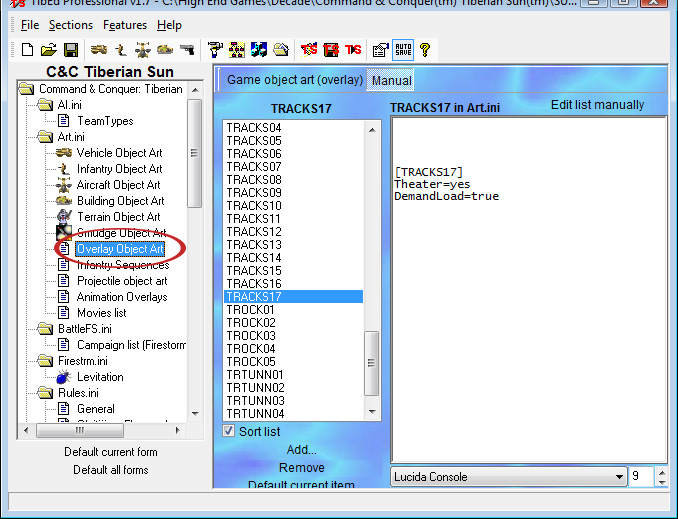
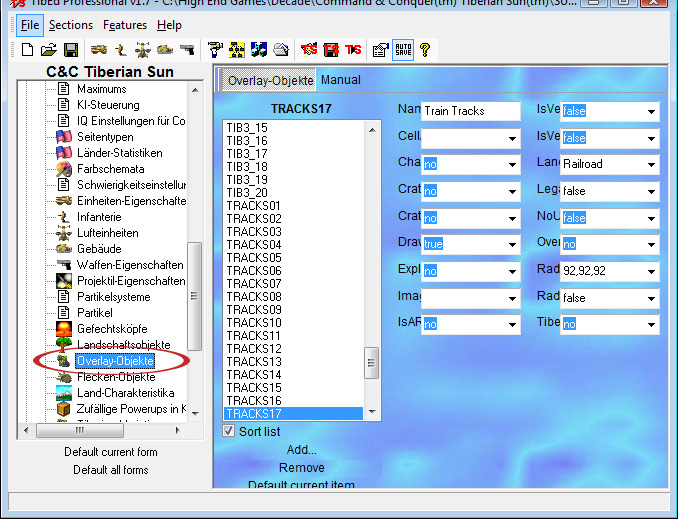
i make a overlay art and an overly type the new one track17 (shown on foto with TibEd hase the same properties as the other tracks like 01 to 16 (except the name Wink ) [2.jpg and 1.jpg

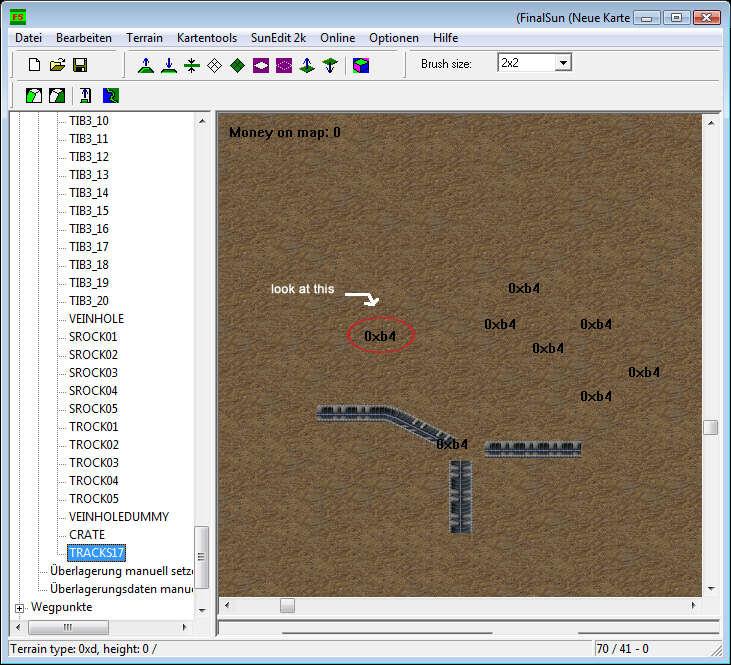
but its shown on Final Sun as: 0xb4
and and empty at the game like the picture

whats wrong? Sad
im helpless Question

hope you can help Smile

sry for my bad englisch Rolling Eyes


show.jpg
 Description:
yeah these the nice ones :)
 Filesize:  37.5 KB
 Viewed:  2676 Time(s)

show.jpg


2.jpg
 Description:
add overlay art
 Filesize:  177.58 KB
 Viewed:  2676 Time(s)

2.jpg


3.jpg
 Description:
add overlay object
 Filesize:  207.04 KB
 Viewed:  2676 Time(s)

3.jpg


1.jpg
 Description:
wtf is wrong with these?
 Filesize:  295.51 KB
 Viewed:  2675 Time(s)

1.jpg


Back to top
View user's profile Send private message
Tony
Commander


Joined: 02 Apr 2005
Location: United States

PostPosted: Thu Dec 17, 2009 12:20 am    Post subject: Reply with quote  Mark this post and the followings unread

This topic should have been posted in Tiberian Sun Editing Forum but no worries, a moderator will come along and move it.

Also, you will be better off using notepad or notepad++ for your ini editing.

Back to top
View user's profile Send private message Skype Account
Lin Kuei Ominae
Seth


Joined: 16 Aug 2006
Location: Germany

PostPosted: Thu Dec 17, 2009 12:31 am    Post subject: Reply with quote  Mark this post and the followings unread

Don't use TibEd for ini modding.
You have only changed rules.ini and TibEd obviously hasn't added the needed keys to art.ini too.

_________________
SHP Artist of Twisted Insurrection:  Nod buildings

Public SHPs
X-Mech Calendar (28 Mechs for GDI and Nod)
5 GDI, 5 Nod, 1 Mutant, 1 Scrin unit, 1 GDI building

Tools
Image Shaper______TMP Shop______C&C Executable Modifier

Back to top
View user's profile Send private message
Mig Eater
Defense Minister


Joined: 13 Nov 2003
Location: Eindhoven

PostPosted: Thu Dec 17, 2009 12:38 am    Post subject: Reply with quote  Mark this post and the followings unread

Did you change the file extension to track17.tem?

_________________


Back to top
View user's profile Send private message Visit poster's website ModDB Profile ID YouTube User URL Facebook Profile URL Twitter Channel URL
Lord_CombinE
Civilian


Joined: 14 Dec 2009
Location: Germany

PostPosted: Thu Dec 17, 2009 11:36 am    Post subject: Reply with quote  Mark this post and the followings unread

no i didnt 'cause tracks01 to 16 is shp too

in the rules and art.ini i add all correct but its shown again as 0xb4

Back to top
View user's profile Send private message
Tony
Commander


Joined: 02 Apr 2005
Location: United States

PostPosted: Thu Dec 17, 2009 11:54 am    Post subject: Reply with quote  Mark this post and the followings unread

Lin Kuei Ominae wrote:
You have only changed rules.ini and TibEd obviously hasn't added the needed keys to art.ini too.

This.

Mig Eater wrote:
Did you change the file extension to track17.tem?

and this.

Lastly.. did you add these roads into temperate.ini ?

Back to top
View user's profile Send private message Skype Account
Morpher
General


Joined: 28 Jan 2005

PostPosted: Thu Dec 17, 2009 1:54 pm    Post subject: Reply with quote  Mark this post and the followings unread

I thought this was an error on finalsun's area, this happened with TO's custom train track bits for some reason, just showed up as numbers. Then again that was two years ago.

_________________


Back to top
View user's profile Send private message
Regulus
Commander


Joined: 16 Feb 2008
Location: The Lone Star State

PostPosted: Thu Dec 17, 2009 2:50 pm    Post subject: Reply with quote  Mark this post and the followings unread

The only way I have found to get junctions to work at all is to add them as terrain pieces themselves, not as overlays.

_________________
You come for the modding but you stay for the Crap Forum.

Back to top
View user's profile Send private message Skype Account
Lord Unforgiven
Rocket Infantry


Joined: 23 Apr 2009
Location: Belgium

PostPosted: Sat Dec 19, 2009 1:24 am    Post subject: Reply with quote  Mark this post and the followings unread

Regulus wrote:
The only way I have found to get junctions to work at all is to add them as terrain pieces themselves, not as overlays.

I was thinking the same.

Lord_CombinE, keep those tiles, they're usefull, thanks! But I don't think that TS has proper game code for train switches (or whatever they're called), as Regulus said. However, since trains already work ingame on these tiles, these tiles can be used to correct the visual errors.

Back to top
View user's profile Send private message
Regulus
Commander


Joined: 16 Feb 2008
Location: The Lone Star State

PostPosted: Sat Dec 19, 2009 3:14 am    Post subject: Reply with quote  Mark this post and the followings unread

Also, trains move one tile at a time behind one another, that way they don't bypass each other while they are moving. If you have a 2x2 tile and give the tile the "rail" terrain type, the cars will attempt to move to the extra tiles in order to bypass the lead vehicle.

_________________
You come for the modding but you stay for the Crap Forum.

Back to top
View user's profile Send private message Skype Account
Bittah Commander
Defense Minister


Joined: 21 May 2003
Location: The Netherlands

PostPosted: Sat Dec 19, 2009 5:35 am    Post subject: Reply with quote  Mark this post and the followings unread

I found that any overlay made or edited in OS SHP Builder won't show up in Final Sun. To Fix this, simply use XCC Mixer to convert the overlay to PNG, then convert it back to SHP again and it'll show in Final Sun Smile

_________________

Back to top
View user's profile Send private message ModDB Profile ID YouTube User URL Facebook Profile URL
Blade
Cyborg Commando


Joined: 23 Dec 2003

PostPosted: Sat Dec 19, 2009 12:06 pm    Post subject: Reply with quote  Mark this post and the followings unread

The Y type junctions as shown will work perfectly as overlay, the same layout is used in the YR TX. Multi-tile terrain pieces are only used for other junction layouts.

Back to top
View user's profile Send private message
Display posts from previous:   
Post new topic   Reply to topic Page 1 of 1 [12 Posts] Mark the topic unread ::  View previous topic :: View next topic
 
Share on TwitterShare on FacebookShare on Google+Share on DiggShare on RedditShare on PInterestShare on Del.icio.usShare on Stumble Upon
You cannot post new topics in this forum
You cannot reply to topics in this forum
You cannot edit your posts in this forum
You cannot delete your posts in this forum
You cannot vote in polls in this forum
You cannot attach files in this forum
You can download files in this forum


Powered by phpBB © phpBB Group

[ Time: 0.2690s ][ Queries: 17 (0.0151s) ][ Debug on ]