-1 Lose Transports - any transports are dissolved
?? Lose Units, Lose Transports - all units dissolved
?? Keep Units, Keep Transports - all units retained
?? Lose Units, Keep Transports - only transports retained
?? Keep Units Farthest - only units furthest away are retained
?? Keep Units Nearest - only nearest units are retained
?? Greatest Threat - group together at object posing greatest threat
-40094 Least Threat - group together at object posing least threat
Are the group numbers known? or obsolete? or unimportant?
I don't understand the "Full=" tag either. I've read the AI.ini guide but I don't understand what it means.
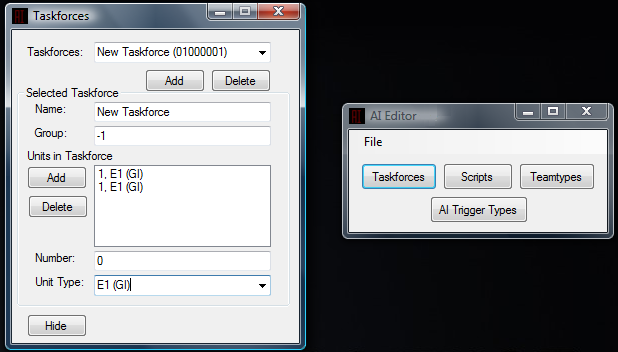
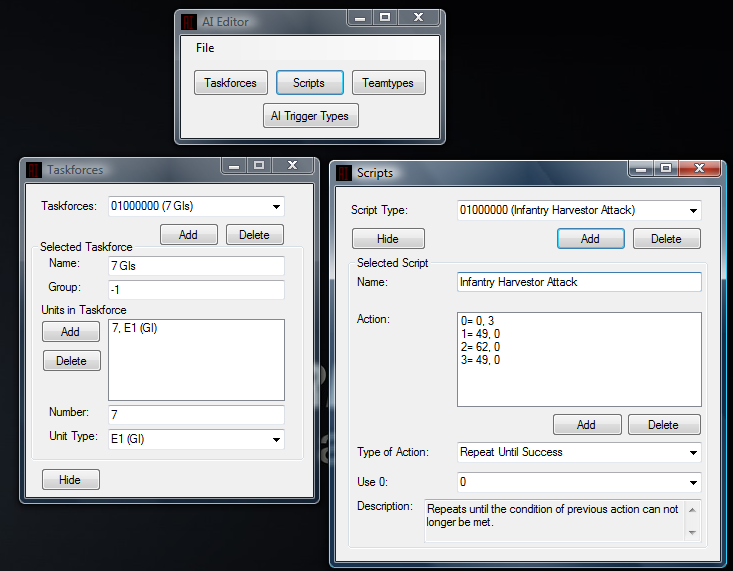
I'm making a AI Editor. Last edited by Edge on Mon Aug 02, 2010 7:58 am; edited 1 time in total QUICK_EDIT
Welcome to the ztyping AI. It's not easy, it never will be and a text editor is the best way to go. _________________ Discord: princess_marisa
Steam QUICK_EDIT
Should be used only in map files, this can be set to 'yes' or 'no' and determines if any units within the associated TaskForce should be initially 'full' as determined by the PipScale= statement in their RULES.INI entry - this applies only to Ore Miners and transport type units in Red Alert 2. If the TaskForce contains a Transport and other units, the units are automatically placed in the Transport for reinforcement purposes.
what doesn't work about it? _________________ I am authorized to send out the TMP Studio, PM ME IF YOU WANT IT And check this out, these were sent to me for help with terrain and zdata help along with TMP Studio/Builder
Anyways this is what I have so far, its based off Final Alerts because I like I've got all the planning finished yesterday but I still need to know what the groups stuff is so I can add it to my planning. The Taskforces part is finished.
Okay point taken, but I'm still making a program for myself to make it easier and faster. I'm not asking about what tool is best to edit it.
So back to my question/real topic about Groups and the "Full=" tag.
"full"
In AI terms its talking about transport and other units/flying units/ buildings that when all pips are full or units as meet all passangers/bunker units that can be loaded.
Then the AI says if full is yes.
This tag will allow the unit to move to the next objective IE ( move to enemy base and deploy) or do something
"Group"
this meets all the units in "team" this "group" AI name selects them
Disclamer:
Im still new at Red Alert 2 but the AI hasn't really changed heavily form TS if/or at all. and i've been modding TS for a while so yeah i know a little
about RA2 AI as i have expermented somewhat with AI coding.
If you need more.
ask some veterans like (IE EVA-155 or Mig eater just to name two there is much,much more, people that know.) if you need more information on this meanings. _________________ Link to a document to see what mods i have and/or working on or working with
Click Last edited by Dubzac on Wed Aug 04, 2010 4:44 am; edited 1 time in total QUICK_EDIT
You don't pay much attention, do you? I already posted the definition to Full earlier on. It's one thing to miss that, but it's another to give incorrect information in the process. Group isn't quite as you've said either.
On TaskForces wrote:
Group= - defines the default grouping for the units in this TaskForce which is therefore used when it has executed (or does not have) a ScriptType. This is over-ridden by the Group= setting in the associated TeamType. The following values can be used;-
-1 Lose Transports - any transports are dissolved
?? Lose Units, Lose Transports - all units dissolved
?? Keep Units, Keep Transports - all units retained
?? Lose Units, Keep Transports - only transports retained
?? Keep Units Farthest - only units furthest away are retained
?? Keep Units Nearest - only nearest units are retained
?? Greatest Threat - group together at object posing greatest threat
-40094 Least Threat - group together at object posing least threat
On TeamTypes wrote:
Group=
This defines a specific grouping for the units in this TaskForce which is used when executing its ScriptType. This over-rides the Group= setting in the associated TaskForce. The following values can be used;-
-1 Lose Transports - any transports are dissolved and do not execute the script
?? Lose Units, Lose Transports - all units dissolved, nothing executes the script
?? Keep Units, Keep Transports - all units retained and all execute the script
?? Lose Units, Keep Transports - only transports retained to execute script
?? Keep Units Farthest - only units furthest away are retained
?? Keep Units Nearest - only nearest units are retained
?? Greatest Threat - group together at object posing greatest threat
-40094 Least Threat - group together at object posing least threat
I've read the AI.ini guide but I don't understand what it means.
@FuryQueen He gave exactly what I was looking for.
For the group stuff, are the values between "-1" and "-40094" known? Last edited by Edge on Tue Aug 03, 2010 7:47 pm; edited 1 time in total QUICK_EDIT
You'll have to ask DCoder for that since he can rummage through the EXE. I've not seen other values used, not even by Westwood so that may not even be accurate information as well. _________________ Discord: princess_marisa
Steam QUICK_EDIT
if you use DCoder's AI Editor I think it shows the values, I think. I don't have it on front of me to check this out. I'll have to check out some things when I get back to my computer.
I know about the side by side error.... I think you have to DL the other version of it. The first version works on Windows Me, Vista gave me that error until I DL the other version. The side by side error is gone in this one. Works on Vista and Windows 7
He posted up on Renegade that the source code is lost. I do know that the buildings codes, like when you want to move to closest, farthest, less importance, the last number is wrong, you would have to edit that by hand. scroll down on that post to see what I mean, I put a comment in there. _________________ I am authorized to send out the TMP Studio, PM ME IF YOU WANT IT And check this out, these were sent to me for help with terrain and zdata help along with TMP Studio/Builder
You don't pay much attention, do you? I already posted the definition to Full earlier on. It's one thing to miss that, but it's another to give incorrect information in the process. Group isn't quite as you've said either.
On TaskForces wrote:
Group= - defines the default grouping for the units in this TaskForce which is therefore used when it has executed (or does not have) a ScriptType. This is over-ridden by the Group= setting in the associated TeamType. The following values can be used;-
-1 Lose Transports - any transports are dissolved
?? Lose Units, Lose Transports - all units dissolved
?? Keep Units, Keep Transports - all units retained
?? Lose Units, Keep Transports - only transports retained
?? Keep Units Farthest - only units furthest away are retained
?? Keep Units Nearest - only nearest units are retained
?? Greatest Threat - group together at object posing greatest threat
-40094 Least Threat - group together at object posing least threat
On TeamTypes wrote:
Group=
This defines a specific grouping for the units in this TaskForce which is used when executing its ScriptType. This over-rides the Group= setting in the associated TaskForce. The following values can be used;-
-1 Lose Transports - any transports are dissolved and do not execute the script
?? Lose Units, Lose Transports - all units dissolved, nothing executes the script
?? Keep Units, Keep Transports - all units retained and all execute the script
?? Lose Units, Keep Transports - only transports retained to execute script
?? Keep Units Farthest - only units furthest away are retained
?? Keep Units Nearest - only nearest units are retained
?? Greatest Threat - group together at object posing greatest threat
-40094 Least Threat - group together at object posing least threat
thank you any body have that link on mod enc about AI cause i forgot yesterday. too sick to look for it _________________ Link to a document to see what mods i have and/or working on or working with
Click QUICK_EDIT
Thanks, it works! but unfortunately its visually overwhelming.
Anyways I'm halfway done with mine. I just need to do a few things with the script part and then I just need to finish Teamtypes, AI Triggers, and Save/Load.
Edit: lol moment. Typo in the Description for the Scripts ~ fixed.
You cannot post new topics in this forum You cannot reply to topics in this forum You cannot edit your posts in this forum You cannot delete your posts in this forum You cannot vote in polls in this forum You cannot attach files in this forum You can download files in this forum


 AI
AI