Project Perfect Mod Forums
:: Home :: Get Hosted :: PPM FAQ :: Forum FAQ :: Privacy Policy :: Search :: Memberlist :: Usergroups :: Register :: Profile :: Log in to check your private messages :: Log in ::


The time now is Tue May 12, 2026 10:23 pm
All times are UTC + 0
How to add new FX(laser,sonicshockwave,missle, fire etc.) ?
Moderators: Global Moderators
Post new topic   Reply to topic Page 1 of 1 [4 Posts] Mark the topic unread ::  View previous topic :: View next topic
Author Message
Guest


PostPosted: Mon Sep 20, 2010 3:06 pm    Post subject:  How to add new FX(laser,sonicshockwave,missle, fire etc.) ?
Subject description: in mod gamec&c3
Reply with quote  Mark this post and the followings unread

How to add new FX(laser,sonicshockwave,missle, fire etc.) in mod c&c3

Who know about this, sir?

Help me, please. Crying or Very sad

Back to top
Guest123
Vehicle Driver


Joined: 23 May 2010
Location: New Zealand

PostPosted: Tue Sep 21, 2010 4:41 am    Post subject: Reply with quote  Mark this post and the followings unread

i personally do not know how to create an effect from scratch and get it in-game so i use a different method of modifying the original effects
(this works for trail fx, lasers, flamethrowers and not the actual things connected to projectiles like exhaust)


have a look in 'FXParticleSystem.xml'. from that file you can copy the original effects you need e.g use things like:
- the 'RailgunCore' effects for lasers (although this will not be like the Nod lasers on the avatar and remember to rename the 'new' effect)

once you have done this go into 'FXList.xml' and make a new entry that references your effect e.g (in FXListGDI)

<FXList id="FX_RailGunFire">
<NuggetList>
<ParticleSystem
Particle="RailgunCore"
UseTarget="true"
OrientToObject="true"
Ricochet="true" />
<ParticleSystem
Particle="RailgunThreads"
UseTarget="true"
OrientToObject="true"
Ricochet="true" />
<ParticleSystem
Particle="RailgunThreads"
UseTarget="true"
OrientToObject="true"
Ricochet="true" />
<ParticleSystem
Particle="RailgunThreads"
UseTarget="true"
OrientToObject="true"
Ricochet="true" />
<ParticleSystem
Particle="RailgunFireFlash"/>
<ParticleSystem
Particle="RailgunFireSmoke"/>
<ParticleSystem
Particle="RailgunFireDistort"/>

<!-- <Sound Value="ZoneTrooperGunFire" /> -->
</NuggetList>
</FXList>

this entry references everything that railguns use in-game.

once you have done this add it as firefx to your desired weapon in the weapon.xml file

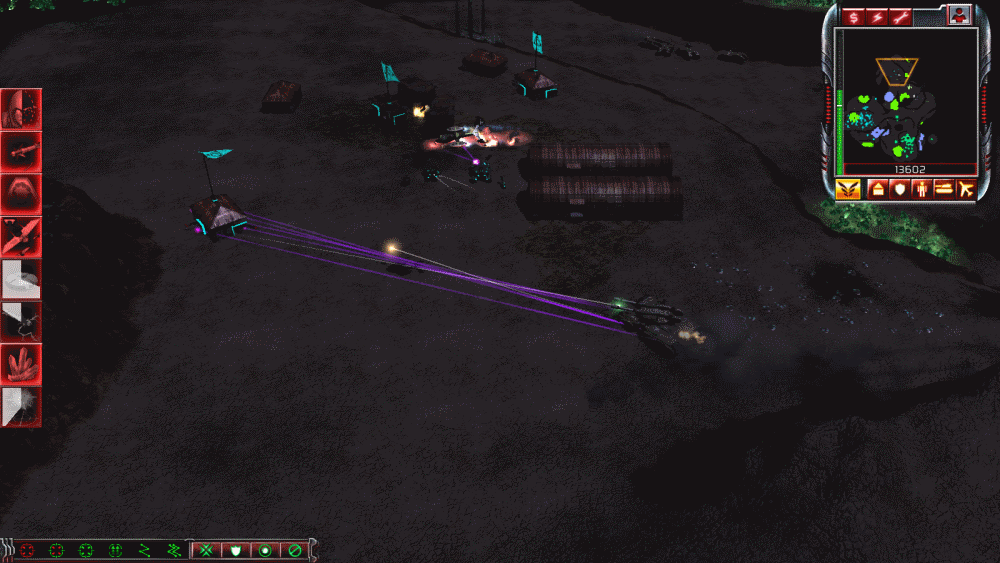
this is a result of this sort of fx modding:


Laser Infantry.gif
 Description:
 Filesize:  153.57 KB
 Viewed:  3914 Time(s)

Laser Infantry.gif


Back to top
View user's profile Send private message
Guest


PostPosted: Wed Sep 22, 2010 12:41 am    Post subject: Reply with quote  Mark this post and the followings unread

Thank you very much for tutorial modify original effect, sir. Smile


anyone else, who know about make new effect in mod game c&c3 ,sir ?

please. Sad

Back to top
Guest


PostPosted: Wed Sep 22, 2010 1:03 am    Post subject: Reply with quote  Mark this post and the followings unread

One more question , sir. Embarassed

and Sound for FX , how to looking for and add new about sound FX, sir?

Back to top
Display posts from previous:   
Post new topic   Reply to topic Page 1 of 1 [4 Posts] Mark the topic unread ::  View previous topic :: View next topic
 
Share on TwitterShare on FacebookShare on Google+Share on DiggShare on RedditShare on PInterestShare on Del.icio.usShare on Stumble Upon
Quick Reply
Username:


If you are visually impaired or cannot otherwise answer the challenges below please contact the Administrator for help.


Write only two of the following words separated by a sharp: Brotherhood, unity, peace! 

 
You can post new topics in this forum
You can reply to topics in this forum
You cannot edit your posts in this forum
You cannot delete your posts in this forum
You cannot vote in polls in this forum
You cannot attach files in this forum
You can download files in this forum


Powered by phpBB © phpBB Group

[ Time: 0.2826s ][ Queries: 14 (0.1075s) ][ Debug on ]