Posted: Wed Sep 22, 2010 5:44 am Post subject:
reworking of my new terrain 3-29-11
3d max roads updated. All old pics have been deleted. Going to be posting a video of how things look in game soon. _________________ I am authorized to send out the TMP Studio, PM ME IF YOU WANT IT And check this out, these were sent to me for help with terrain and zdata help along with TMP Studio/Builder
The corners could do with some work, having a nice big curve then a sharp 90 degree angle just doesn't look right. I know the normal RA2 roads do this but their large size make it less noticeable. _________________
Posted: Wed Sep 22, 2010 8:36 am Post subject:
roads
well these are the 2 lane roads, not the 4 lane roads. On my earlier works with the 4 lane road I did notice this. So, do you still think I should make the corners more rounded since these are the 2 lane? Thanks for the feedback.
edit: after I posted I started thinking about your post. You are saying the sharp turn doesn't look realistic? correct? Even though ra2/yuri 2 lane road has the same look. And should I make the inside curve too? or is leaving that squared off fine? _________________ I am authorized to send out the TMP Studio, PM ME IF YOU WANT IT And check this out, these were sent to me for help with terrain and zdata help along with TMP Studio/Builder
Posted: Wed Sep 22, 2010 9:06 am Post subject:
roads
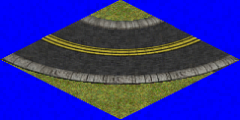
Well, since I have been learning 3D Max more I have gotten a bit better at making the bends. When I first tried making the bends they looked terrible so I went with the style WW had done ( one curve with teh other squared off). I agree on making them more curved and both curved not just the outer one.
The only draw back is that the 2 lane bends are 2 by 2 and now to make a better bend will be least 3 by 3 _________________ I am authorized to send out the TMP Studio, PM ME IF YOU WANT IT And check this out, these were sent to me for help with terrain and zdata help along with TMP Studio/Builder
Posted: Wed Sep 22, 2010 10:38 am Post subject:
roads
OK Mig, any better? IMO the north and south bends are fine, but the east and west bends are a tad wider than they should be. Anyone have an opinion? Fine? or should I bring those 2 in a bit. I started with the north corner, copied and mirrored to make the west corner, then copied and mirrored to make the south and east. _________________ I am authorized to send out the TMP Studio, PM ME IF YOU WANT IT And check this out, these were sent to me for help with terrain and zdata help along with TMP Studio/Builder
Posted: Wed Sep 22, 2010 7:46 pm Post subject:
road
Deformat wrote:
I like it, tho the tiles look a bit awkward to me.
you are referring to the ground tile? If so, I made a big enough so I can make it a texture for 3d max. It was just some I did as a temp thing, _________________ I am authorized to send out the TMP Studio, PM ME IF YOU WANT IT And check this out, these were sent to me for help with terrain and zdata help along with TMP Studio/Builder
Your corners still need work IMO. West and East corners look too wide and the other two look too skinny.
you should use a really HD image for the ground tile previews. just so it dosent look tiled like that. either that or uncheck the tiled option.
Other than that it a good start. QUICK_EDIT
Posted: Wed Sep 22, 2010 8:22 pm Post subject:
road
Cranium wrote:
Your corners still need work IMO. West and East corners look too wide and the other two look too skinny.
you should use a really HD image for the ground tile previews. just so it dosent look tiled like that. either that or uncheck the tiled option.
Other than that it a good start.
The concrete tile is not being used it was just something I was using as a template. The original tile is much brighter than that one
I already knew about the W/E corners, as for the N/S...I disagree, but I agree. That doesn't make sense....but....when looking at the original pieces and the way the game play looks, there are instances where they look fine.
Take a look at the n/s roads in game or FA2 (more like nw/se) then look at the true n/s and w/e you can see there is difference. The width is less on n/s & e/w. So because of this could be fine, not dismissing your observation. I'll play around with still. I could send you the MAX file if you want to see what you can do.
I agreed with MigEater about the bend, but then I realized there are instances where my original piece are fine so I will have both. That bend will be least 4by4. I have to check it out and post up when I get more done. _________________ I am authorized to send out the TMP Studio, PM ME IF YOU WANT IT And check this out, these were sent to me for help with terrain and zdata help along with TMP Studio/Builder
Posted: Wed Sep 22, 2010 9:18 pm Post subject:
road
Well, I was almost ready to say that would be the piece I was going to work with until I found a back up copy on my flash drive. It still has bends on both sides and I'm pretty sure it will be smaller than 5by5 _________________ I am authorized to send out the TMP Studio, PM ME IF YOU WANT IT And check this out, these were sent to me for help with terrain and zdata help along with TMP Studio/Builder
Posted: Fri Sep 24, 2010 9:16 pm Post subject:
Roads/Corners/Intersection
Ok, did some more work, think this looks alot better than my first piece. Now I just have to find out how it looks in game.
Thoughts on the center lines.....little bit more narrow??? _________________ I am authorized to send out the TMP Studio, PM ME IF YOU WANT IT And check this out, these were sent to me for help with terrain and zdata help along with TMP Studio/Builder
Posted: Fri Oct 01, 2010 11:05 am Post subject:
roads
This will be new angled 2 lane road. Look at the arrows...do these roads look narrow enough? And pay no attention to the grey inside the grass area. I am still working with it in 3d max to get an idea if it looks proper _________________ I am authorized to send out the TMP Studio, PM ME IF YOU WANT IT And check this out, these were sent to me for help with terrain and zdata help along with TMP Studio/Builder
Posted: Fri Oct 29, 2010 8:40 pm Post subject:
terrain
One of my new roads that I created using 3D max, its a 5by4 piece with corners chopped to run along the cliff. It lines up properly and I know about the grass tiles I am working on that...........so........ on to fixing some more _________________ I am authorized to send out the TMP Studio, PM ME IF YOU WANT IT And check this out, these were sent to me for help with terrain and zdata help along with TMP Studio/Builder
In you oct 1st post, the scale is fine on the E-W, but N-S isn't going to look right unless your making it a 2 lane with a "shoulder" like you see on a standard highway..
Newest post : looking good, time to get to work on those dividing lines. QUICK_EDIT
Posted: Sat Oct 30, 2010 5:08 am Post subject:
rework
This pic I zoomed in a bit to show how the run right along the cliff. I'll post up a pic of in game when I get the other angle done. Yeah, the lines. I wasn't worried about them yet, this part was hard enough, getting the first piece you lay to line up with the second piece you lay. Spent about an hour or so using 3D Max to rotate the piece about 15 degrees a time just to get them to line up. I have lines made up in the 3dmax piece, I just didn't add them. If I get what I need to get done this weekend, and all my pieces flow, I will be linking some pics of about 60 new road pieces, new 2 lane and 4 lane in both regular and cobble stone roads.
And the Oct 1 post the roads were narrowed a bit after that pic. The pic was for some feed back. I'll change that pic to show the new road I am using. _________________ I am authorized to send out the TMP Studio, PM ME IF YOU WANT IT And check this out, these were sent to me for help with terrain and zdata help along with TMP Studio/Builder
Posted: Sat Oct 30, 2010 6:38 pm Post subject:
rework
Cranium wrote:
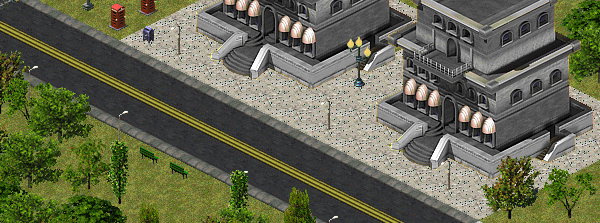
looks kinda like my old roads
second pic is of my new roads.
Don't make me open a can of whoop a$* on you, lol
When I first started this project using 3D Max you posted up some pics and I realized that using 3D Max was the way to go. Nice building, looks sweet. I am assuming that the road is the 4 lane highway? My road curbs need some texture work and the lines. Your first road pic has the plainness of TS. Did you make that in 3D max? If so I'll have to contact you on MSN to talk to you. _________________ I am authorized to send out the TMP Studio, PM ME IF YOU WANT IT And check this out, these were sent to me for help with terrain and zdata help along with TMP Studio/Builder
if you were referring to my roads, they are designed for my terrain. Dont think they would work that good with any other. As you can see in the image here, they have my grass terrain.
Posted: Sat Oct 30, 2010 11:49 pm Post subject:
terrain
I am working on urban and when they are done ill do some snow pieces. Mine might be the same, you would have to use my grass/concrete/dirt tiles _________________ I am authorized to send out the TMP Studio, PM ME IF YOU WANT IT And check this out, these were sent to me for help with terrain and zdata help along with TMP Studio/Builder
Posted: Thu Nov 11, 2010 2:44 am Post subject:
New pic update
both roads follow along side the cliff. I have to trim a few tiles off so I can get them closer to the cliff. Only question is, should I make these roads have an intersection or just the bends?? _________________ I am authorized to send out the TMP Studio, PM ME IF YOU WANT IT And check this out, these were sent to me for help with terrain and zdata help along with TMP Studio/Builder
Posted: Fri Nov 12, 2010 8:22 am Post subject:
New pics
new pics of roads _________________ I am authorized to send out the TMP Studio, PM ME IF YOU WANT IT And check this out, these were sent to me for help with terrain and zdata help along with TMP Studio/Builder
Posted: Fri Nov 12, 2010 8:24 am Post subject:
new pics
In game pics of the new roads I have been working on _________________ I am authorized to send out the TMP Studio, PM ME IF YOU WANT IT And check this out, these were sent to me for help with terrain and zdata help along with TMP Studio/Builder
Posted: Fri Nov 12, 2010 8:11 pm Post subject:
reworking of my new terrain 11-12-10
well, I made it because it is suppose to be a road you can place along the cliff. When I put the lines in I will post a new pic. Maybe that is the reason, or maybe its the grass that gives it that appearance. I'll have to check that out _________________ I am authorized to send out the TMP Studio, PM ME IF YOU WANT IT And check this out, these were sent to me for help with terrain and zdata help along with TMP Studio/Builder
Posted: Thu Nov 18, 2010 8:52 pm Post subject:
terrain
Need some opinions on these _________________ I am authorized to send out the TMP Studio, PM ME IF YOU WANT IT And check this out, these were sent to me for help with terrain and zdata help along with TMP Studio/Builder
Posted: Fri Nov 19, 2010 1:48 am Post subject:
reworking of my new terrain 11-18-10
yes, i found a way to get the ground to render different. untick the box shown and render it.
I have a plane for the grass and a plane for the road (which has curbs). I hide the road plane and render the grass, with the box unticked. then open up the TMP builder and import that image and save. Then I hide the grass plane and render the road, with the box ticked and import that to TMP builder and save. Open both pieces in the TMP Editor and copy to photoshop cs3. I have the grass plane as layer 1 and the road plane as layer 2 and erase the screwed up grass. Having that box ticked for the roads changes the image, it gives the image a blurry look.
The reason for 2 planes wasn't for the rendering at first. It was so I can change the UV Mapping of each texture. Otherwise it would be screwed up _________________ I am authorized to send out the TMP Studio, PM ME IF YOU WANT IT And check this out, these were sent to me for help with terrain and zdata help along with TMP Studio/Builder
Posted: Fri Nov 19, 2010 7:18 pm Post subject:
terrain
Look at pic 3DMax cobble. See how the cobble looks good and the grass looks like crap.
Look at pic 3dmax grass. See how the grass looks good and the cobble looks like crap
When I render for grass, I hide everything else in the scene, showing only the grass and render that. With the Filter Maps box unticked.
I open up TMP Builder (The one stated in my sig). I create a tile that is 14 by 14. Under tools is a tab that you can import template. I import the grass png and save it, something like Grass tile 01.
I go back to 3D Max and tick that box and render it. The cobble looks good and grass like crap.
I again go back to TMP Builder and import template and saved it as Cobble tile 01.
I open TMP Editor opening both files and copy and paste into Photoshop CS3. The Grass tile 01 is layer 1 (bottom layer) and place Cobble tile 01 on top of that.
I erase the bad looking grass so the good grass shows. I save that file as a PNG. and import that back to TMP Builder, not TMP Editor. The TMP Builder will allow me to save the file where TMP Editor will crash.
Once saved I put it in a mix file and run FA2. I really don't have to look at it in FA2, I do just so I make sure every thing lines up.
The process I used is just for the purpose of making my roads and bends as one piece so all roads and bends are perfectly made.
* note * the imported image and the tile image have the same dimensions otherwise TMP Builder will not import. If the tile is 100 by 100, then I have the render of 3D Max set to render at that size. I believe my tiles at 840 by 420.
Does this help you understand my process? I could possibly make a video to show if you. You might not care but it might help someone else if they want to see.
Some of my textures are from http://www.cgtextures.com/ and some are from Generals/Zero Hour (ground tiles only not metal or wood). _________________ I am authorized to send out the TMP Studio, PM ME IF YOU WANT IT And check this out, these were sent to me for help with terrain and zdata help along with TMP Studio/Builder
well I guess the second pic there dosent look to bad at all, though the cobble texture could probably use a little bump to give more detail.
Also do a little more work on the curbs as they look a little plain. but, yes they are looking much better. QUICK_EDIT
Posted: Fri Nov 19, 2010 9:44 pm Post subject:
terrain
Well, they are for my WW2 mod so plain would be good. But at the same time I thinking they needed something. I have been testing textures from 2 sites plus gen/zh.
The cobble in the first pic is what I am using with the grass in the second pic, with the aid of PS C3. _________________ I am authorized to send out the TMP Studio, PM ME IF YOU WANT IT And check this out, these were sent to me for help with terrain and zdata help along with TMP Studio/Builder
Yeah, the second picture is pretty decent. You may not appreciate that sharpness now, but it helps for realistic effect. I'd say move on and make more in this style. QUICK_EDIT
Posted: Sat Nov 20, 2010 12:25 am Post subject:
terrain
You guys suck, lol... After looking at both pics side by side I can see your points about sharpness. As for the brightness, I am having some trouble with that. LKO's foundation lighting make them too bright I played around a bit with the settings. Have to find a better tutorial on that. Thanks for the feedback. _________________ I am authorized to send out the TMP Studio, PM ME IF YOU WANT IT And check this out, these were sent to me for help with terrain and zdata help along with TMP Studio/Builder
Posted: Sat Nov 20, 2010 2:50 am Post subject:
terrain
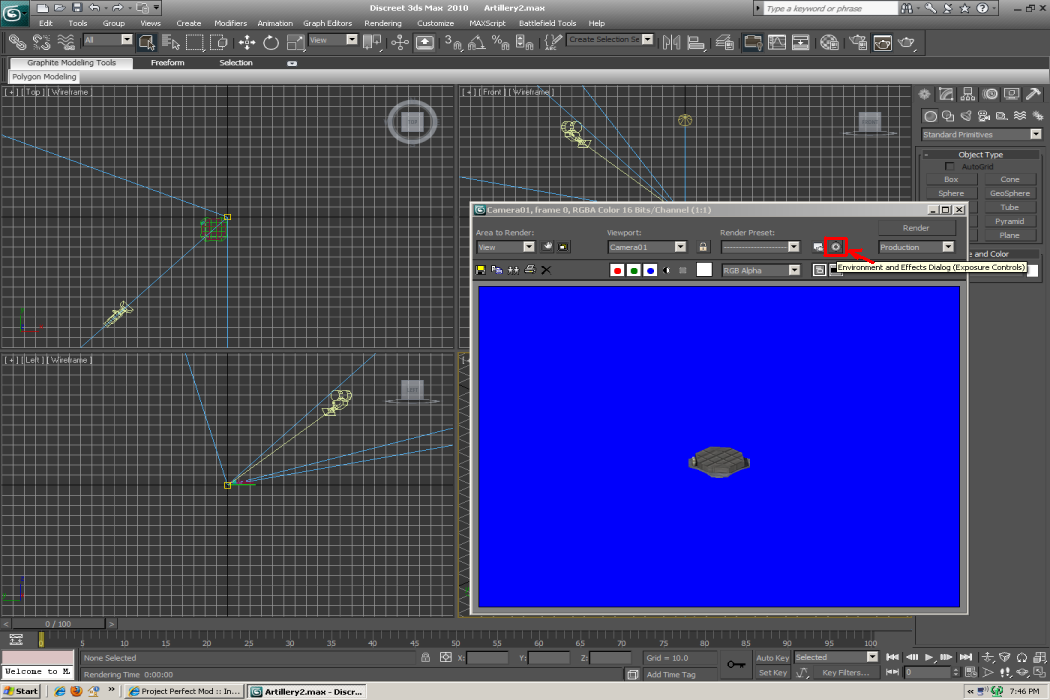
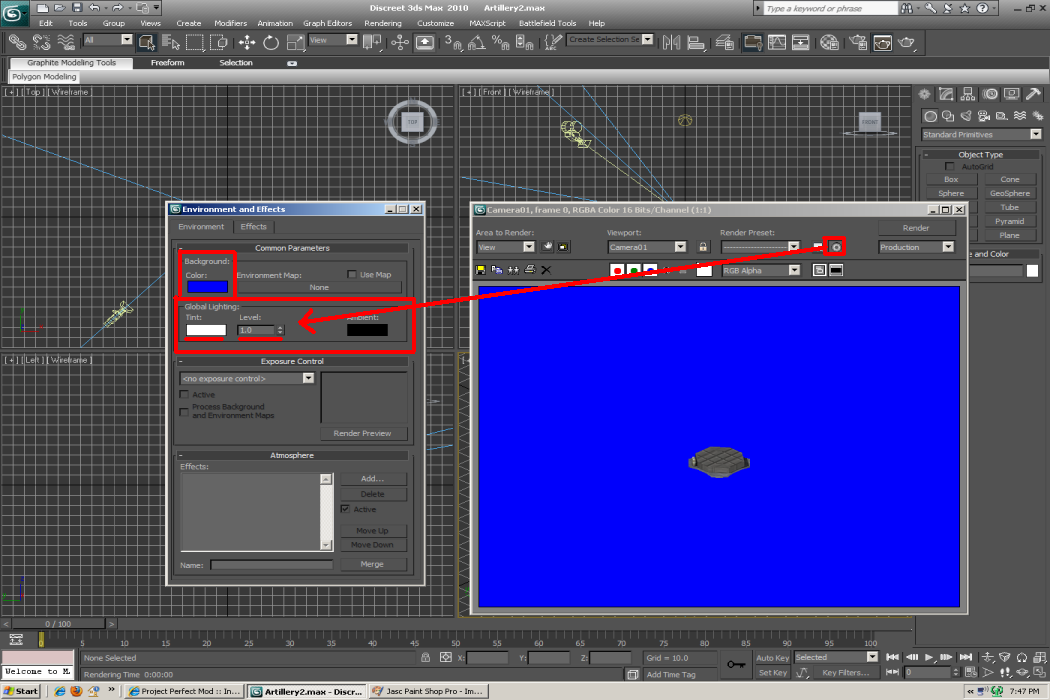
That means I'll have to set up a camera. At the current time none of my pieces have any, just lights. Thanks Ill have to look into this. _________________ I am authorized to send out the TMP Studio, PM ME IF YOU WANT IT And check this out, these were sent to me for help with terrain and zdata help along with TMP Studio/Builder
Posted: Sat Nov 20, 2010 12:25 pm Post subject:
terrain
I can run 3D Studio Max, but I still don't know all the features. i didn't that you can get there through the render window because yours is blue and mine is black and I saw camera on yours. I like the black background because I have the blue from the game and I set up my ground as blue so I can get a rough size down for buildings. But thanks for showing me that, it should be some help. _________________ I am authorized to send out the TMP Studio, PM ME IF YOU WANT IT And check this out, these were sent to me for help with terrain and zdata help along with TMP Studio/Builder
Posted: Thu Jan 13, 2011 12:57 pm Post subject:
reworking of my new terrain 1-13-11
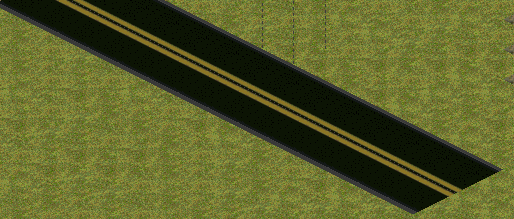
Ok, new pic. Hopefully by the end of today I will have about 10 more to show, could be a bit more depending on what I get done today and if every thing lines up as I need it to. The pics I post up will be images rendered from 3D Max and in game pics. The curb color is still a WIP. _________________ I am authorized to send out the TMP Studio, PM ME IF YOU WANT IT And check this out, these were sent to me for help with terrain and zdata help along with TMP Studio/Builder
The corners look a little strange IMO. I also don't know why you want the roads raised from the ground like that (or at least the edges), looks bad IMO. QUICK_EDIT
Wow...I didn't expect something really good here. And I think you should use straight yellow line instead, in the middle. _________________ Lost Relic[mod] Lost Relic[game] QUICK_EDIT
Posted: Thu Jan 13, 2011 11:30 pm Post subject:
reworking of my new terrain 1-13-11
For the record these are the 2 lane roads.
OmegaBolt wrote:
The corners look a little strange IMO. I also don't know why you want the roads raised from the ground like that (or at least the edges), looks bad IMO.
The corners are a bend at 90 degree angle, the inside curves are giving me a bit of trouble as far as looks. I'm gonna post up in game images, maybe the will look better.
Vefbl4 wrote:
Wow...I didn't expect something really good here. And I think you should use straight yellow line instead, in the middle.
As stated these are 2 lanes, but I will have different images to post up; solid line roads and broken yellow lines. Once I do this and get some feedback I'll decide which ones I am gonna use.
Still working on these 2 pieces right now.
BTW - because of comments made by Blade, Marshall & DJBreit I want to make these as good as I can. I respect all opinions and comments that are made. I want something that the community will like and want to use. So if someone sees something that needs work or could be better, I would rather re-work the piece rather than put up something that sucks.
Thanks for the feedback guys. _________________ I am authorized to send out the TMP Studio, PM ME IF YOU WANT IT And check this out, these were sent to me for help with terrain and zdata help along with TMP Studio/Builder
I don't know what feedback do you want. But those lines make your road look like a toy road. And the size differences between them doesn't make it any better. But still you are free to do what ever you want. _________________ Lost Relic[mod] Lost Relic[game] QUICK_EDIT
I agree with Vef. I'd say that yellow dotted lines along the edges and a white line along the middle would look better because atm it does look a bit like a "toy road".
Though this is RA2, so the fact that it doesn't look particularly realistic is pretty much null. QUICK_EDIT
You cannot post new topics in this forum You cannot reply to topics in this forum You cannot edit your posts in this forum You cannot delete your posts in this forum You cannot vote in polls in this forum You cannot attach files in this forum You can download files in this forum


 reworking of my new terrain 3-29-11