Project Perfect Mod Forums
:: Home :: Get Hosted :: PPM FAQ :: Forum FAQ :: Privacy Policy :: Search :: Memberlist :: Usergroups :: Register :: Profile :: Log in to check your private messages :: Log in ::


The time now is Tue May 26, 2026 9:05 pm
All times are UTC + 0
RA3 Flak troopers mine is always visible
Moderators: Global Moderators
Post new topic   Reply to topic Page 1 of 1 [11 Posts] Mark the topic unread ::  View previous topic :: View next topic
Author Message
Madin
Plasma Trooper


Joined: 05 Apr 2009

PostPosted: Sun Oct 31, 2010 3:24 pm    Post subject:  RA3 Flak troopers mine is always visible Reply with quote  Mark this post and the followings unread

So I tried to import the Flaktrooper from RA3, not so hard except the Flaktroopers secondary weapon is always visible in it's unanimated state!


I have only used the primary weapon animations, has I have no interest in the mine ability, but this problem is too visible to ignore.

Any ideas? Confused

Back to top
View user's profile Send private message
Golan
Flamethrower


Joined: 21 Nov 2007

PostPosted: Sun Oct 31, 2010 3:42 pm    Post subject: Reply with quote  Mark this post and the followings unread

If you extracted it as a W3X you can manually hide the mesh. Just edit the W3X file with a texteditor, look for the correct W3DMesh block and set the Hidden attribute to true (you might have to add it first).
Code:
[...]
   </W3DCollisionBox>
   <W3DMesh id="GVDISR_SKN.WEAPONA_DIS01" Hidden="true" GeometryType="Normal" SortLevel="1">
      <BoundingBox>
[...]

_________________
Off Duty.

Back to top
View user's profile Send private message
Madin
Plasma Trooper


Joined: 05 Apr 2009

PostPosted: Sun Oct 31, 2010 7:07 pm    Post subject: Reply with quote  Mark this post and the followings unread

Golan wrote:
If you extracted it as a W3X you can manually hide the mesh. Just edit the W3X file with a texteditor, look for the correct W3DMesh block and set the Hidden attribute to true (you might have to add it first).
Code:
[...]
   </W3DCollisionBox>
   <W3DMesh>
      <BoundingBox>
[...]


The Trooper, mine and Flak launcher all one skinned mesh!

Back to top
View user's profile Send private message
Ju-Jin
Cyborg Firebomber


Joined: 23 Mar 2009
Location: Germany

PostPosted: Sun Oct 31, 2010 8:06 pm    Post subject: Reply with quote  Mark this post and the followings unread

Madin wrote:
Golan wrote:
...


The Trooper, mine and Flak launcher all one skinned mesh!

no. mesh != model

_________________

Back to top
View user's profile Send private message Skype Account
Madin
Plasma Trooper


Joined: 05 Apr 2009

PostPosted: Tue Dec 14, 2010 1:24 am    Post subject: Reply with quote  Mark this post and the followings unread

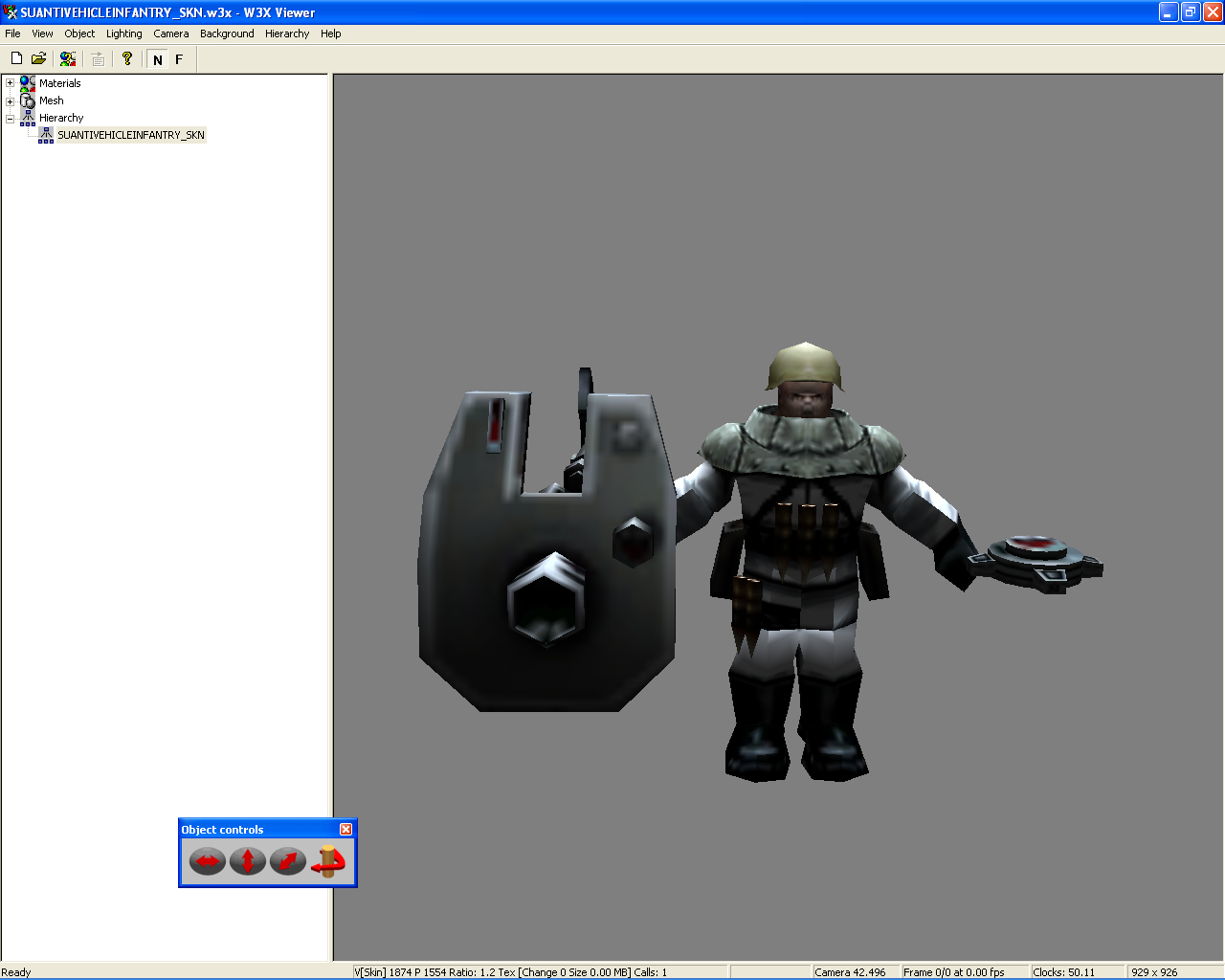
I am assuming that the mine is probably attached to the 'PROPS02' bone.
It is part of the 'SUANTIVEHICLEINFANTRY_SKN.FLAKTROOPER'.


Flak_Fail.jpg
 Description:
 Filesize:  222.31 KB
 Viewed:  7764 Time(s)

Flak_Fail.jpg


Back to top
View user's profile Send private message
Scorched Earth
Commander


Joined: 14 Sep 2008
Location: California, USA

PostPosted: Tue Dec 14, 2010 2:23 am    Post subject: Reply with quote  Mark this post and the followings unread

Madin wrote:
I am assuming that the mine is probably attached to the 'PROPS02' bone.
It is part of the 'SUANTIVEHICLEINFANTRY_SKN.FLAKTROOPER'.


I couldn't help but notice, it looks as if he's got a real sour candy in his mouth. Laughing

_________________
Okay, my signature was starting to annoy even me.

Back to top
View user's profile Send private message
gufu
Defense Minister


Joined: 22 Dec 2004
Location: Tiberium Research Center N27

PostPosted: Tue Dec 14, 2010 5:17 am    Post subject: Reply with quote  Mark this post and the followings unread

For some reason he reminds me of Quake playermodels.

_________________
DUNK!

Back to top
View user's profile Send private message Skype Account
Stygs
Cyborg Cannon


Joined: 27 Nov 2005
Location: Germany

PostPosted: Thu Dec 16, 2010 11:02 pm    Post subject: Reply with quote  Mark this post and the followings unread

If the mine and the trooper are part of the same mesh, then there nothing you can do (exept maybe move the bone so its allways underground).
And going by the number of draw calls on the picture, this seems to be the case.

However, I am wondering if there is the same problem in vanilla RA3.

_________________

Back to top
View user's profile Send private message Skype Account
Madin
Plasma Trooper


Joined: 05 Apr 2009

PostPosted: Fri Dec 17, 2010 1:02 am    Post subject: Reply with quote  Mark this post and the followings unread

Stygs wrote:
If the mine and the trooper are part of the same mesh, then there nothing you can do (except maybe move the bone so its always underground).
And going by the number of draw calls on the picture, this seems to be the case.

However, I am wondering if there is the same problem in vanilla RA3.

No RA3 does not have the same problem, that's what gets me.
I tried to see if I could work out how it was done.
There is a small difference to the 'InfantryFX' shader in RA3 vs the C&C3 version.

Fascinating has this problem is for me, I decided to edit the model in Max, then rebind it to the GDI Missile man skeleton.

Back to top
View user's profile Send private message
Stygs
Cyborg Cannon


Joined: 27 Nov 2005
Location: Germany

PostPosted: Mon Jan 17, 2011 11:45 pm    Post subject: Reply with quote  Mark this post and the followings unread

I think I figured the problem out:

Looks like the bone for the mine (Props02) has a visbility setting that normaly hides the mine.

Which means that even if trough the whole model is one single mehs, some verticles (the mine) can be hidden while the others (the soldier) will not be affected.
Seems like this a new addition for RA3 because it never worked like that before (in CNC3, you can only hide whole meshs).

_________________

Back to top
View user's profile Send private message Skype Account
Madin
Plasma Trooper


Joined: 05 Apr 2009

PostPosted: Tue Jan 18, 2011 7:11 am    Post subject: Reply with quote  Mark this post and the followings unread

Nice detective work!
So we can finally close the chapter on this little saga.

_________________

Back to top
View user's profile Send private message
Display posts from previous:   
Post new topic   Reply to topic Page 1 of 1 [11 Posts] Mark the topic unread ::  View previous topic :: View next topic
 
Share on TwitterShare on FacebookShare on Google+Share on DiggShare on RedditShare on PInterestShare on Del.icio.usShare on Stumble Upon
Quick Reply
Username:


If you are visually impaired or cannot otherwise answer the challenges below please contact the Administrator for help.


Write only two of the following words separated by a sharp: Brotherhood, unity, peace! 

 
You can post new topics in this forum
You can reply to topics in this forum
You cannot edit your posts in this forum
You cannot delete your posts in this forum
You cannot vote in polls in this forum
You cannot attach files in this forum
You can download files in this forum


Powered by phpBB © phpBB Group

[ Time: 0.2498s ][ Queries: 14 (0.0107s) ][ Debug on ]