Posted: Thu Oct 20, 2011 6:29 am Post subject:
Vehicle SHP Request/Help
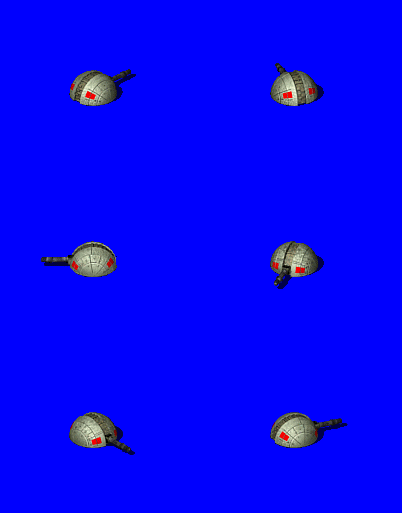
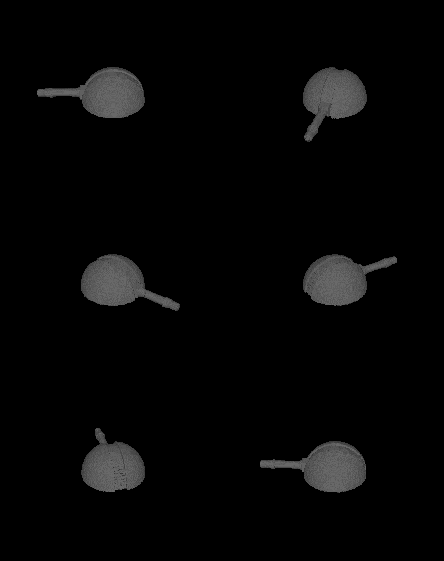
Well with the current file attachment bug still broken... I'm trying to make a new SHP Vehicle. Basically if i use the package importing I only get the Images from 0-3, the ones numbered 4-7 Don't get included... The next four either turn into the grayscale versions of 0-3 or are a merged product of grayscaled 0-3 and underneath them are the colored versions of 4-7.
the grey scale ones your referring to are the shadow frames. click options and untick shadows. You have to create seperate shadows for the units. So you will have 8 facings and 8 shadow. _________________
The enemy shall be injected with toxic poison - Venom QUICK_EDIT
what i would do in this instance is open your 8 images in a photo editing program, erase the vehicle from the image, and keep the pink shadow. then recolor the pink shadow to color 0,0,196. Rename and resave the images. That will give you your eight shadow frames.
The remap is the lower left 16 colors 16-32.
for the other thing, you'll have to adjust the PrimaryFireFLH= in your artmd.ini
Also, if this unit dosent have a turret, you can make/add some firing anim frames to it to give it a little more pizazz. _________________
The enemy shall be injected with toxic poison - Venom QUICK_EDIT
Here's pretty much the sorta almost finished product, Can anybody help me to put the background as transparent. I can't seem to get the 0,0 to be chosen as it's background.
open the images in your photoshop and apply 0,0,252 to the background. Or simply do a color change in shp builder.
Also when importing into shp builder make sure you choose the right shp type and palette. _________________
The enemy shall be injected with toxic poison - Venom QUICK_EDIT
Of course you have to give it in art.ini the correct settings for
StartWalkFrame=
WalkFrames=
StartStandFrame=
StandingFrames=
FiringFrames=
StartFiringFrame=
DeathFrames=
DeathFrameRate=
MaxDeathCounter=
StartDeathFrame=
you can also adjust on the unit WalkRate= and IdleRate= in rulesmd.ini
though in this case IdleRate wont make much of a difference seeing how theres no idle animation. So just use WalkRate= to determine how fast you want the vehicle to move. _________________
The enemy shall be injected with toxic poison - Venom QUICK_EDIT
The Attack Animations are playing in the right direction, just the basic 8 don't
N=NE
NE=E
E=SW
SW=S
S=NW
NW=W
W=N
If that makes any sense...
And how do i write up the sequence to use the way the Magnetron Attacks buildings to it so it can show the 5 Frames of animation. With the damage only taking effect at the 5th Frame QUICK_EDIT
hmmm, this thing is way oversized. It's like 2x4 and units should be no bigger than 1x1. I make mine slightly bigger at 1.5x1.5. But 2x4 is just like astronomically huge for a vehicle. I've downloaded it, so I'll see what I can do for you.
Also your images arent all centered, makes it look funny when its going thru the motions. _________________
The enemy shall be injected with toxic poison - Venom QUICK_EDIT
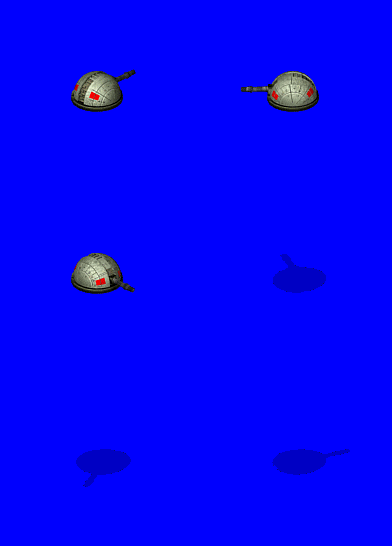
heres the improved .shp, cameos, and coding. but I only fixed the 8 facings, I'm not gonna fix all those firing frames. You'll just have to deal with it. I did resize all of the frames too, so they are now 1x1. They are also using the 0,0,252 background now. And what happened to the shadows? all thats in the file is blank shadow frames?
you downloaded the old one. re-download the new .shp and codes.
I'll rewrite the rules code so its a hover unit unless you know how too then go ahead and do it yourself.
and yes, shadows would be nice. Dosent look right without them _________________
The enemy shall be injected with toxic poison - Venom QUICK_EDIT
Its working now, I'll just rerip them later this week.
Since I noticed the Remapping Colors are a bit off so I'm going to try to redo them from a fresh set.
For Infantries it's basically:
N-NW-W-SW-S-SE-E-NE correct?
Currently this is how they are arranged from 00-End?
Stand
Walk
Idle
Attack
Dying
(The unit doesn't have a prone, but I'm thinking I could use the Sequence Maker from the SHP Builder to make him go into "Prone" mode with the Idle?
And... this is the Infantry resized by 25% , Does it look okay in this size? Last edited by Atomic_Noodles on Sun Oct 23, 2011 2:30 am; edited 1 time in total QUICK_EDIT
Hate to inform you but your efforts on the turret were all for nothing as turrets need 32 facings not 8. It wont work, sorry. _________________
The enemy shall be injected with toxic poison - Venom QUICK_EDIT
^^that would look ugly as hell ingame.
8 facings only look decent on small things, but nothing big like that turret. _________________ SHP Artist of Twisted Insurrection: Nod buildings
It would probably be easier to model it. Looks like all you'll need is a sliced sphere with some simple face extruding, a box, a tube, and a cone _________________
The enemy shall be injected with toxic poison - Venom QUICK_EDIT
hey atomic boodles the hodded man just worked fine with me try Re-naming the him in the Art.md all over and in the Rules.md.
Edit : Btw where did you get robot (the one your using on your avatar) i didnt find in the SWBG files?
You can find the New Units/Sounds from the "Graphics_x1.drs" & "Sounds_x1" file. You'll only have it if you have The Clone Campaigns Expansion Pack for SWGB
Yeah, Although my original plan for the Turret was to make it a Deploy Mode or make it a Hover Tank by adding a Platform for it to have a base on.
It's actually the Top Part of the Turret (Notice the slanted barrel pointing downwards?) The Turret has a Stand, similar to in height to the Tier 2 defenses.
The Repeater Trooper Graphics can be designed as a Deploy Version also actually.
For Example...
It only looks like it's humping from the North and South Direction...
Other Sides have obviously more realistic looking Machine Guns.
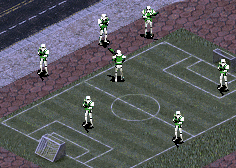
And unless someone else has tried decreasing size. The way I resize the SW/AoEII Units is decrease size by 50% for Infantry and using the Nearest Neighbor Setting (Top Most Option)
And... does this Unit look good enough for Yuri? I recolored its body to look Yuri Brown...
hey Bu7loos, I made the model and vxl for Atomics converted turret. I didnt apply any textures. So if you want you can do what ever it is you do to your vxls.
I think I made the barrel a tad to long, but thats an easy fix. This might even be better to give it a seperate barrel and use the barrel recoil logic.
Update, I tried to get it as close as i could, heres a gif that can be used to convert to .shp
I posted so fast last time I didnt notice that the .gif i posted was missing the base and proper shadows. Heres an updated .gif that can be imported directly into shp builder.
@AtomicNeedles, use this as a stepping stone on how your future turrets should be. Looking forward to seeing more work from you.
Animation1.gif
Description:
Filesize:
45.96 KB
Viewed:
4009 Time(s)
_________________
The enemy shall be injected with toxic poison - Venom QUICK_EDIT
and I didnt mean for you to do 3d modeling, I just ment use that as a helper so you know what turrets should look like facings and shadow wise. _________________
The enemy shall be injected with toxic poison - Venom QUICK_EDIT
cranium, could you resize that to the grand cannon size? that turret is really good _________________ "I'll be staying strapped cuse my mac-eleven make my nuts bigger" QUICK_EDIT
Well I basically just made it for AtomicNoodles to use as a reference, but I suppose i could resize it. _________________
The enemy shall be injected with toxic poison - Venom QUICK_EDIT
You cannot post new topics in this forum You cannot reply to topics in this forum You cannot edit your posts in this forum You cannot delete your posts in this forum You cannot vote in polls in this forum You cannot attach files in this forum You can download files in this forum


 Vehicle SHP Request/Help