Posted: Tue Jul 09, 2013 10:27 pm Post subject:
Trouble making a rendering environment
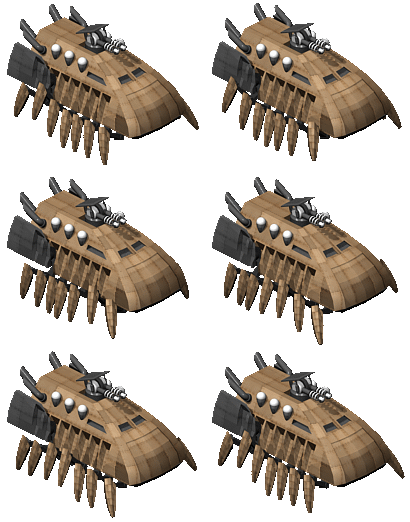
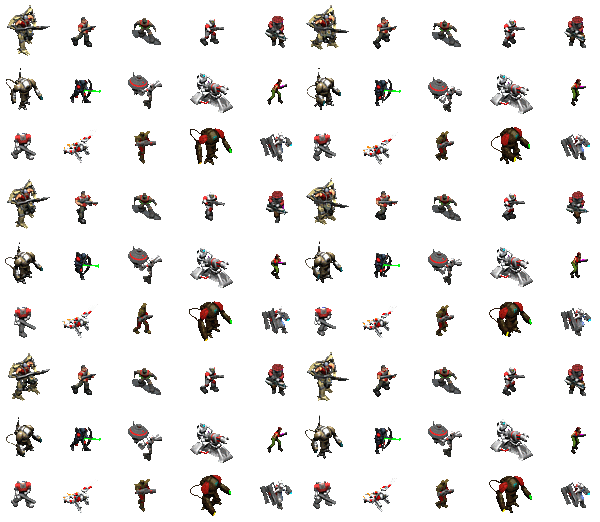
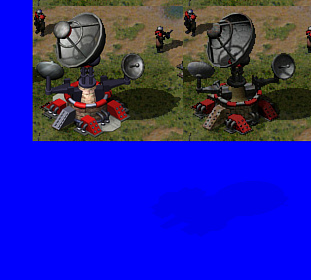
Hey, I know people have posted their own render environments, and so far I've tried Flyby's script, and a bunch of other templates, but none of them seem to work perfectly. See images below:
Really wrong lighting and can't seem to get it ingame.
Help a guy out here, just had a stroke lol. _________________ "Don't beg for things; Do it yourself or you'll never get anything." QUICK_EDIT
DonutArnold's templates are pretty accurate - Download link - and work perfectly for me.
I have no idea why they haven't been stickied, since they're so damn useful.
I believe that Gangster recently released a similar template (with a bunch of soviet buildings and textures included). QUICK_EDIT
I've tried DonutArnold's, and maybe I'm just bad at setting it up, but I can't get it to look as nice as everyone else's renders or even stock RA2 ones. I mean, my textures even have light and reflection maps :/ _________________ "Don't beg for things; Do it yourself or you'll never get anything." QUICK_EDIT
Joined: 22 Nov 2010 Location: Iszkaszentgyorgy, Hungary
Posted: Wed Jul 10, 2013 5:23 am Post subject:
Here's Gangster's, but his variasnt is for Max2011.
http://www.ppmsite.com/forum/viewtopic.php?t=33444 _________________ "If you didn't get angry and mad and frustrated, that means you don't care about the end result, and are doing something wrong." - Greg Kroah-Hartman
=======================
Past C&C projects: Attacque Supérior (2010-2019); Valiant Shades (2019-2021)
=======================
WeiDU mods: Random Graion Tweaks | Graion's Soundsets
Maintainance: Extra Expanded Enhanced Encounters! | BGEESpawn
Contributions: EE Fixpack | Enhanced Edition Trilogy | DSotSC (Trilogy) | UB_IWD | SotSC & a lot more... QUICK_EDIT
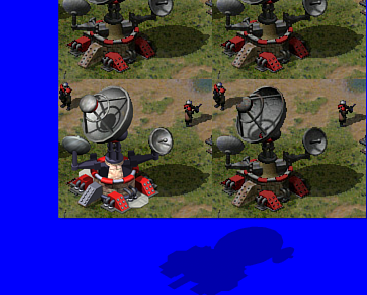
Gangster's shadow light is wrong, you will need to fix that
DonutArnold's is better but the light's and shadow needs to be intensified, flyby's has issues, the fill lights cast shadows and a lot of other issues, but the shadow light is better
1 is flys
2 Arnold's
3 gangsters
(Yes i made that model )
Well I didn't know Gangster's template even existed, so that helps, thanks!
No offense to everyone else's but by far this one takes the cake for me. Fixing the shadow was relatively easy, it may not be perfect, but it looks pretty close I think.
Thanks for the help. _________________ "Don't beg for things; Do it yourself or you'll never get anything." QUICK_EDIT
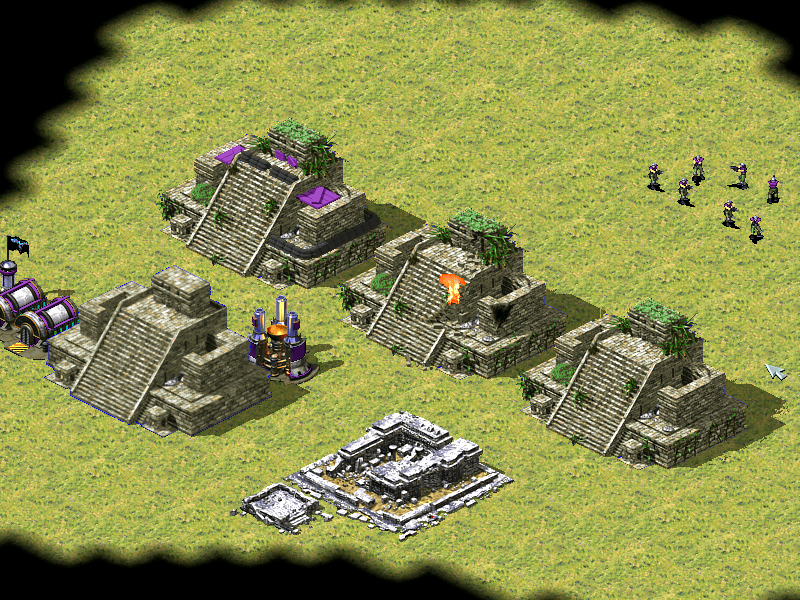
That looks so much better than the original. Too bad Westwood was never big on vegetation. Hell, that map is supposed to be in a Meso-American jungle, yet looks like a golf course. _________________ QUICK_EDIT
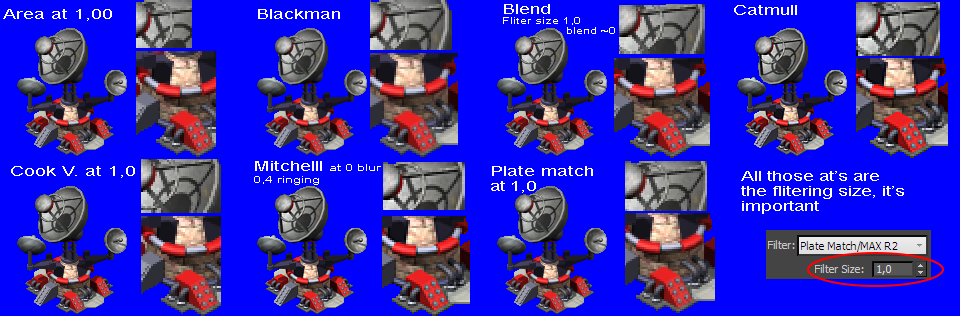
Render using Catmull-Rom please. Also, render without AA and use the non-AA image to cut the blurry pixels (expand in photoshop the blue background of the non-AA image by 3 pixels, merge it with an empty layer, cut the AA layer by selecting via wand tool the new blue background, and let the cutted layer over the original non-AA layer, for crisp shadows and easy conversion) QUICK_EDIT
Thanks, Catmull seems to render pretty nicely. I never realized how much of a pain in the ass it is to de-anti-alias these things, even without being rendered with AA on, it still has blue artifacts.
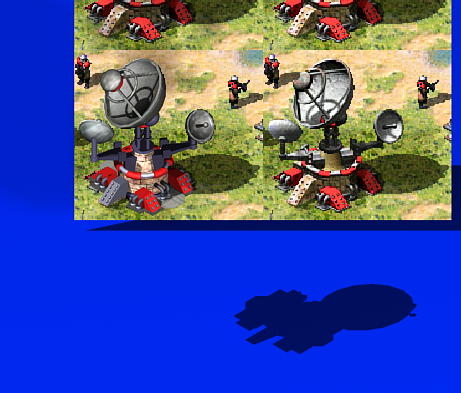
If you like it so much, maybe I'll release it I have a couple things to fix as you can see, and there's sandbags missing (for some reason they didn't render), but I'll just say the bush is in the way, and they didn't feel like it needed to be blocked off thanks to natural cover.
I wish Slice was more complicated.
EDIT: Just noticed that bush was placed nicely enough to catch fire.
camex02.png
Description:
Old one is the Conyard.
Filesize:
726.18 KB
Viewed:
2982 Time(s)
_________________ "Don't beg for things; Do it yourself or you'll never get anything." QUICK_EDIT
Sigh, why do people always insist on rendering things against a plane anyways? You could render the main frame(s) simply against the background with the 'Do not anti-alias against a background' setting turned on, and the shadow frame(s) separately against a plane with the renders object(s) made 'invisible' by setting the material to one that is similar/identical to that of the plane. Saves a hassle of cutting anything out of the frames in Photoshop etc. and leaves you with absolutely no unwanted blue stuff at the edges of the rendered item. _________________ QUICK_EDIT
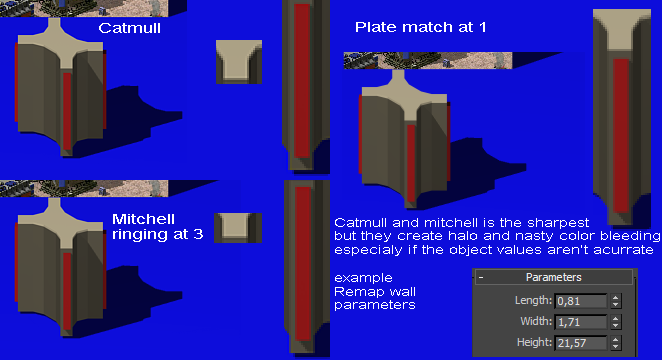
Catmull adds kinda a unsharp-mask which adds halo-ing (makes the edges glow and creates color artifacts), you can try rendering it with Plate Match/MAX R2 with the filtering set to 1,0 it's just like catmull but without the unsharp mask so there aren't any artifacts on remaps and bright colors and mask out/cut out the remap, then add the unsharp mask or a high pass mask to the building it self in PS/PSP/GIMP/any other of the million apps for image postprocessing
Also select the shadow light, in the modify panel open the general parameters tab and under shadows select ray traced or shadow map with size set to say 10000 for sharpest shadow casting, it actually gives sharper results than ray traced
I actually only rendered the shadows against the plane, but I didn't know that the AA against background could be turned off, thanks!
I've actually found Blackman does a really nice job, without the edge brightness as well.
Thanks for all the feedback, now it seems my only problem is the fact that Itoo's Forest plugin doesn't save its placement, but I guess I have to take that up with them. (Wish I got a different plugin for trees) _________________ "Don't beg for things; Do it yourself or you'll never get anything." QUICK_EDIT
I actually only rendered the shadows against the plane, but I didn't know that the AA against background could be turned off, thanks!
I've actually found Blackman does a really nice job, without the edge brightness as well.
Thanks for all the feedback, now it seems my only problem is the fact that Itoo's Forest plugin doesn't save its placement, but I guess I have to take that up with them. (Wish I got a different plugin for trees)
Sigh, why do people always insist on rendering things against a plane anyways? You could render the main frame(s) simply against the background with the 'Do not anti-alias against a background' setting turned on, and the shadow frame(s) separately against a plane with the renders object(s) made 'invisible' by setting the material to one that is similar/identical to that of the plane. Saves a hassle of cutting anything out of the frames in Photoshop etc. and leaves you with absolutely no unwanted blue stuff at the edges of the rendered item.
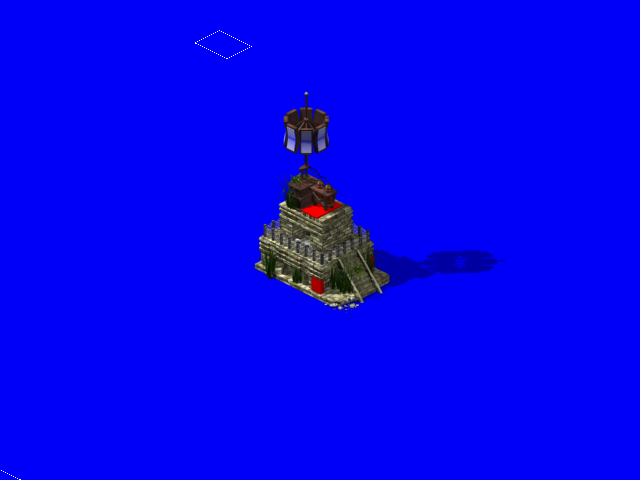
Platematch it is then. And to continue making sure I can figure this crap out, I made something with a turret (or at least that should have a turret).
I rendered turret frames for this as well (16 frames is what is needed correct? or is it 32?) but can't seem to get them to work ingame. Copied the prism tower code, but the turret doesn't show. _________________ "Don't beg for things; Do it yourself or you'll never get anything." QUICK_EDIT
Joined: 22 Nov 2010 Location: Iszkaszentgyorgy, Hungary
Posted: Fri Jul 12, 2013 7:18 am Post subject:
32 is needed, _________________ "If you didn't get angry and mad and frustrated, that means you don't care about the end result, and are doing something wrong." - Greg Kroah-Hartman
=======================
Past C&C projects: Attacque Supérior (2010-2019); Valiant Shades (2019-2021)
=======================
WeiDU mods: Random Graion Tweaks | Graion's Soundsets
Maintainance: Extra Expanded Enhanced Encounters! | BGEESpawn
Contributions: EE Fixpack | Enhanced Edition Trilogy | DSotSC (Trilogy) | UB_IWD | SotSC & a lot more... QUICK_EDIT
Sigh, why do people always insist on rendering things against a plane anyways? You could render the main frame(s) simply against the background with the 'Do not anti-alias against a background' setting turned on, and the shadow frame(s) separately against a plane with the renders object(s) made 'invisible' by setting the material to one that is similar/identical to that of the plane. Saves a hassle of cutting anything out of the frames in Photoshop etc. and leaves you with absolutely no unwanted blue stuff at the edges of the rendered item.
^^that.
Doing that for years this way and always worked very well.
Well I'm gonna stick to Catmull, just because I think it looks the best.
Anyway, for those of you that don't render against planes, what do you do for shadows then? Non-AA shadows kinda look like crap, but unless rendered against background I don't see a way to not AA against the plane with the shadow still receiving AA. _________________ "Don't beg for things; Do it yourself or you'll never get anything." QUICK_EDIT
i use a blue material (cuz my background is blue) with full self illumination and use on the whole building and then render it with plane
what it does it that the building doesnt recieve and kind of shadows but the plane still recieves the building's shadow
oh and i use AA (Catmull) for rendering the building and shadows and i have "Dont AA against background" checked _________________ <----- Clickable QUICK_EDIT
You cannot post new topics in this forum You cannot reply to topics in this forum You cannot edit your posts in this forum You cannot delete your posts in this forum You cannot vote in polls in this forum You cannot attach files in this forum You can download files in this forum


 Trouble making a rendering environment




 )
)





 I have a couple things to fix as you can see, and there's sandbags missing (for some reason they didn't render), but I'll just say the bush is in the way, and they didn't feel like it needed to be blocked off thanks to natural cover.