Project Perfect Mod Forums
:: Home :: Get Hosted :: PPM FAQ :: Forum FAQ :: Privacy Policy :: Search :: Memberlist :: Usergroups :: Register :: Profile :: Log in to check your private messages :: Log in ::


The time now is Wed Apr 08, 2026 1:06 pm
All times are UTC + 0
How to recoloring units and structures ?
Moderators: Global Moderators, Red Alert 2 Moderators
Post new topic   Reply to topic Page 1 of 1 [5 Posts] Mark the topic unread ::  View previous topic :: View next topic
Author Message
Wolfsangel
Cyborg Soldier


Joined: 25 Jul 2014
Location: Unkown

PostPosted: Fri Jul 25, 2014 2:07 pm    Post subject:  How to recoloring units and structures ? Reply with quote  Mark this post and the followings unread

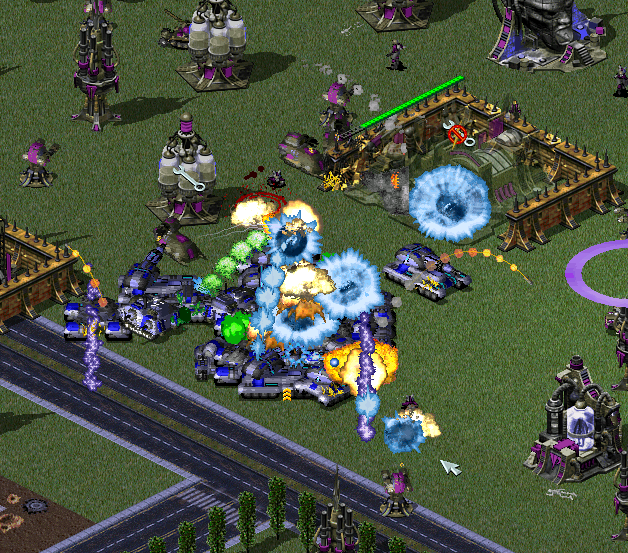
Hello,  I wonder how to recoloring units and structures ?  

Like Project Phantom mod, How can I do recoloring like this ?


_________________
Call me as " Xenaga "

Back to top
View user's profile Send private message
WoRmINaToR
Rocket Cyborg


Joined: 31 Oct 2008
Location: AKA Sir Prize

PostPosted: Fri Jul 25, 2014 11:58 pm    Post subject: Reply with quote  Mark this post and the followings unread

You might want to provide a specific example of what exactly you're trying to do, so we can give you more specific advice.

For starters though, if you haven't already, you will need to download/install Voxel Section Editor (VXLSE) to make any edits to voxels (vehicles), and Open Source SHP Builder to modify building and infantry sprites.

Both tools feature scripts that you can run to recolor models/sprites from one color scheme to another. I don't have either tool in front of me at the moment so I can't give specific directions but I can check when I get home.

_________________
New name: Sir Prize. I've switched to a new account to update to the name I've been using everywhere else for the last several years.

Back to top
View user's profile Send private message YouTube User URL
PillBox20
Commander


Joined: 28 Sep 2013
Location: Plovdiv, Bulgaria.

PostPosted: Sat Jul 26, 2014 8:16 am    Post subject: Reply with quote  Mark this post and the followings unread

I am not using the scripts that much when it comes to recoloring a shp. I extract the file in pcx format and use photoshop on the area I want recolored . Then put the files in SHP Builder and save it as shp file.

_________________
"If it ain't broke, don't fix it."
"If you are loyal to everybody, can you truly be loyal to anybody?"
Ares Documentation: http://ares-developers.github.io/Ares-docs/
My YouTube Channel: https://www.youtube.com/channel/UCtxeQoEM_iVd-F-xUIwleyQ
PillBox20's Red Alert 2 Mod: http://www.moddb.com/mods/pillbox20s-red-alert-2/downloads/pillbox20s-red-alert-2-version-02

Back to top
View user's profile Send private message Visit poster's website YouTube User URL Skype Account
Wolfsangel
Cyborg Soldier


Joined: 25 Jul 2014
Location: Unkown

PostPosted: Sat Jul 26, 2014 3:55 pm    Post subject: Reply with quote  Mark this post and the followings unread

Thanks for information, I try this, sometimes this is so hard... for me

_________________
Call me as " Xenaga "

Back to top
View user's profile Send private message
Graion Dilach
Defense Minister


Joined: 22 Nov 2010
Location: Iszkaszentgyorgy, Hungary

PostPosted: Sun Jul 27, 2014 4:44 pm    Post subject: Reply with quote  Mark this post and the followings unread

Actually, PP has palette-tweaks and uses custom-palette on buildings, but it needs an exe-enhancer.

_________________
"If you didn't get angry and mad and frustrated, that means you don't care about the end result, and are doing something wrong." - Greg Kroah-Hartman
=======================
Past C&C projects: Attacque Supérior (2010-2019); Valiant Shades (2019-2021)
=======================
WeiDU mods: Random Graion Tweaks | Graion's Soundsets
Maintainance: Extra Expanded Enhanced Encounters! | BGEESpawn
Contributions: EE Fixpack | Enhanced Edition Trilogy | DSotSC (Trilogy) | UB_IWD | SotSC & a lot more...

Back to top
View user's profile Send private message Visit poster's website ModDB Profile ID
Display posts from previous:   
Post new topic   Reply to topic Page 1 of 1 [5 Posts] Mark the topic unread ::  View previous topic :: View next topic
 
Share on TwitterShare on FacebookShare on Google+Share on DiggShare on RedditShare on PInterestShare on Del.icio.usShare on Stumble Upon
You cannot post new topics in this forum
You cannot reply to topics in this forum
You cannot edit your posts in this forum
You cannot delete your posts in this forum
You cannot vote in polls in this forum
You cannot attach files in this forum
You can download files in this forum


Powered by phpBB © phpBB Group

[ Time: 0.2222s ][ Queries: 9 (0.0088s) ][ Debug on ]