Posted: Tue Mar 08, 2016 4:17 am Post subject:
Darkstorm's Graphics Thread
So I'm working on a private mod with Mutant and CABAL factions, I know the originality is just oozing from me.
I've been wanting some input into how I should design the sidebars. It's easiest for me to go with something untextured since I can't work with textures well enough to make it look real. Anyhow, this is what I was going for with the Mutant sidebar so far. I'll leave the logos I created for the mutants and CABAL below as well. I particularly like the Mutant one. I wish I made a better CABAL one but, other than CABAL's face image, I wouldn't know what to put.
MutantSidebar.png
Description:
Filesize:
27.16 KB
Viewed:
8547 Time(s)
MutantsIconSmall.png
Description:
Filesize:
36.06 KB
Viewed:
8547 Time(s)
CABALIconSmall.png
Description:
Filesize:
16.5 KB
Viewed:
8547 Time(s)
Last edited by Darkstorm on Wed Mar 16, 2016 4:16 am; edited 1 time in total QUICK_EDIT
I think it looks too technically. Especially the grid style in the radar.
The round elements are a good start, but I would suggest in general a more round organic style.
Something like roots and veins symbolizing their tiberium roots, or slapped together debris to show that they take what they can get.
In general i would avoid using clean outer shapes and give them some random noise effect, so they don't look that mathmatical/technological.
As a CABAL icon some circuits could work. Like a CPU on a blue mainboard.
This site could help getting some inspiration.
Maybe also a combination of simple circuits and a round shape symbolizing the earth. _________________ SHP Artist of Twisted Insurrection: Nod buildings
I made a crystal/electric like effect to go with the sidebar. I'm not sure quite where to put it. I could use it in the Radar but then the reset of the sidebar will be a little plain, or I could use it on the sidebar but then I need a new design for the radar that isn't as disorganized.
For the CABAL icon, I tried to add some circuitry to the current design and I think I'm liking it better, it's just the black border of the icon that doesn't show up well in the client.
I think you are going overboard with the green, the existing sidebars mostly match the sides unit colours and while green might be the side color for a mutant faction, only a small area of the units should be that color in the same way red is only a small area on Nod units and isn't everywhere on the side bar. QUICK_EDIT
Yeah, I was afraid of that. I'm not quite sure what other color to use. I guess I should try for a metal texture like the original sidebars but I don't really have the ability for that. QUICK_EDIT
The Plasma filter looks tons better. I mixed a blurred and unblurred layer. It actually is starting to look like a proper sidebar, minus all the actual bits and pieces.
I would suggest something that looks a bit rusty and warn, like it was a hand me down or something that was salvaged, given that the forgotten seem to be living on the fringes. QUICK_EDIT
The oilify filter did make the radar look less square. I'm not sure how I'm going to do the radar animation yet, it'll probably just be a static fade out but I'm not sure yet. As for the rest of the sidebar, I did make some basic buttons for the sidebar functions.
New iteration of the sidebar. I had a hard time thinking of what to put below so I put some graffiti. Not sure if "Rise Up" is what it should say but I know I want something there. As for the remainder, the rust there actually does a pretty good job covering the rest.
Outside of redoing the radar to something matching the industrial theme of the sidebar, I'm pretty confident in this to chop it up for a test run.
Ok, now I've made a basic radar animation. I'm still curious about whether I should try to make a radar more like the originals but this'll work for now.
Ok, to add to this I made a simple loading screen for the mutants based on the same rusted metal texture. It could use a tad more embellishment and doodads, but I need to make an alternate with a spray painted mutant logo below and something else up top. On top of that, I need images for the main portion.
I'm not going to get in trouble from quadrouple posting with another piece of work am I?
In this case, it's the first render of what I hope to be a Mutant Power Plant. I plan to have the top dome to fill with Tiberium like a silo so it's a combination power plant and silo like TI's Nod Power Plants. I would like some feedback if possible on the render.
The lighting on the dome looks strange, like the triangles are facing in random directions.
For which game do you plan this? For TS the building is too big for a 1x1 foundation and too small for a 2x2 foundation.
For RA2 it seems to fit into 1x1, though 1x1 for a powerplant is quite small.
It should get more details and not only 5 primitive shapes: small box, big box, triangle geosphere, 2 cylinder.
The inner details should get a consistent size. See how big doors and windows are on other civil buildings and then make yours match that size.
e.g. your door is very small, even too small for TS, where 1 floor of a building should be about 8 pixel high (8 pixel are about 2 m in height)
In RA2 a floor of a civil building should be about 12 pixel high. Though better check yourself what the general size is, since i have not much experience in RA2 building sizes.
Find better remap locations than red edges on the boxes, which are also too strong anti-aliased to be later well convertible into remap colors and you'll end with a lot of wrong colors after SHP conversion.
The wall texture should show some kind of texture and not only noise. e.g. RA2 is big enough to make even tiny bricks in a brick wall visible. In TS you could try a brick wall texture too, though the small size doesn't allows single bricks to be visible. But the higher detail would be still noticeable.
Then also match the bricks size to the size of doors windows etc, so all the parts of the building work together and create correct proportions.
Try a bit more realism in the design and think how this could work in reality. e.g. when the dome is filled with tiberium, what else is left inside to house all the electronics and machines to create the power? The tiberium would also fill behind the windows, where people are working and die by tiberium radiation.
So you should make the silo part a bit separate from the building. Show that this is a containment area on its own.
Show where people are working, where the power producing machines could be located and show small doodads that give this a bit more realism. Pipes, wires, air vents, a rotating fan, a small transformer station etc etc.
A tiberium dome alone would also look strange. Try to give it a purpose in the powerplants power production. e.g. put a big tube from top into the silo, showing the PP is actually using the tiberium.
Or show that the PPs power is somehow used to contain the dangerous tiberium, for example with force fields or something else. Some kind of visible reason why someone would combine PP and Tibsilo.
P.S. check before if planned logics actually work. I'm not sure if Ares allows visible silo fill animations. _________________ SHP Artist of Twisted Insurrection: Nod buildings
The render was made with DonutArnold's blender template for TS so I'm not sure how to really adjust much of the settings there.
As for the size, I had figured it was too small but I wanted some input before I go messing with everything. Though I figured I'd need to make it bigger in the end anyways.
In regards to realism, this is a power plant for mutants so containment isn't really a priority. Secondly, I figured the dome to be a roof silo so there really wouldn't be any Tiberium below it. Now you could ask how it would serve any function on top, but I didn't think it mattered very much.
getting better.
But the lighting on the geosphere should be fixed and more smaller details added.
Also some kind of thin border around certain parts (windowframes, doorframe, geosphere edges etc) can help to make these parts pop and give some nice light effects when these borders are darker/brighter.
I also think the rather primitive base could get more work and not only 2 simple boxes. Like chamfer the edge of one box.
Attached is an example showing
-better lighting
-remap areas using red only, no bright white reflection parts since these got bad color conversion results
-borders around windows, door, geosphere cage
-smoke stacks not using that strange bright to dark transition, but a correct simple lighting (yours look like they have forced smoothing groups assigned to every polygon)
-small doodads like pipes running next to it, into the geosphere and into a simple oiltank
-texture with a bit more brick wall detail and subtle random dirt spots to give it a bit more realism
Ok, another iteration. I found out why those smoke stacks were so smooth. I don't know why but apparently I put them to shade smooth on all faces for whatever reason. Second, I added a tank which gave me a little insight into how to select and extrude things better. I'm still quite unsure how to make pipes easily but I don't think it really needs one.
I also added more texture to the bricks or rather enabled what I already had. It was on hard light which looked too overwhelming but I switched it to overlay in GIMP which was better.
Like I said, I'm using DonutArnold's template which has preset lighting and rendering settings so I wouldn't know really how to change the lighting in any meaningful or useful way.
Lighting looks the same to me in comparison, just darker textures. _________________ "Don't beg for things; Do it yourself or you'll never get anything." QUICK_EDIT
Lighting looks the same to me in comparison, just darker textures.
Except that the domes reflection is wrong on his powerplant (see the marked triangle)
The lighting of the adjacent triangles is also falling off way too fast, which makes them too dark.
Wow, I didn't even realize I was using an old version of the template, 2.02. However, it doesn't seem like it made much of a difference from what you're showing. Although the remap lighting seems much better.
Well, now it could be a problem of your dome's material/texture settings.
Like the Glossiness (called this way in 3dsmax, no clue how Blender calls it) being too high, thus only very small and sharp reflection points (like for polished metal). Which means in your case only one of the domes triangles has the right angle to produce a bright reflection and all others stay dark.
This is also visible on the small oil tank which has only a very tiny bright spot, while the rest is lit almost in the same brightness.
The remap on the other hand now has a way too low Glossiness, thus almost the entire object is lit in full brightness, making it way to bright and nearly all in the same pure red color.
Try to find some blender tutorials on how to set up materials/textures correct, so they have the right settings to appear as matte or polished metal, plastic, concrete, glass etc. _________________ SHP Artist of Twisted Insurrection: Nod buildings
Joined: 09 Mar 2008 Location: Osaka (JP)/Hong Kong/Germany
Posted: Thu Mar 17, 2016 4:31 pm Post subject:
I'd suggest something more "tribal" for the Mutant logo. E.g. make those elongated triangles under the eye actually look "slashes"-like. I'm not usually a fan of World of Warcraft artwork, but it might be informative on tribal-looking logos. _________________
Mao Zedong wrote:
Our mission, unfinished, may take a thousand years.
Last edited by Millennium on Thu Mar 17, 2016 7:47 pm; edited 1 time in total QUICK_EDIT
Only if your structure has been around for awhile; Wouldn't make much sense if it's freshly built, unless your troops are graffiti artists . _________________ "Don't beg for things; Do it yourself or you'll never get anything." QUICK_EDIT
Joined: 09 Mar 2008 Location: Osaka (JP)/Hong Kong/Germany
Posted: Thu Mar 17, 2016 7:48 pm Post subject:
Eh, spray-painting motivational slogans on the walls could be part of the standard procedure of base construction (just like other factions hang their logo somewhere). I think it can be justified for a junk-y/salvage-y faction.
Regarding the Mutant loadscreen, it has sort of a Fallout feel to it (the rough metal, the air vent, the 50s-ish stencil letters). Maybe fitting pictures for the central portion would be ruined cities and landscapes, with or without post-apocalyptically dressed mutants prowling through them (also consider S.T.A.L.K.E.R.'s artwork for inspiration about how these mutants could be dressed, and/or what the cities and landscapes could look like). _________________
Mao Zedong wrote:
Our mission, unfinished, may take a thousand years.
I always imagined that the mutants would shove chunks of tiberium in their buildings. Last edited by Isaac_The_Madd on Fri Mar 18, 2016 1:04 am; edited 1 time in total QUICK_EDIT
I just thought it would be different. I really don't want to put more windows in. Although I might go ahead anyways.
@Mellennium I'm hoping I can get a concept artist to draw some nice artwork for it. Otherwise, I'll just need to think of some alternative.
@Isaac I will say I'm not a fan of the idea although it is plausible enough. The real obstacle is modelling it though. I guess I could get away with Tiberium fauna growing up the side of one building, but like I said, I'm not a fan of the idea.
In the meantime, I'm considering where to go from here with the mod. I really want to make a Mutant faction and a Mutant campaign though, with some kind of branching if possible. I've ditched the CABAL faction, it was like an ultra powerhouse faction but I didn't really have the infantry SHPs for it and I really wasn't sure where to go with it. So my mod is basically going to be focused on the Mutant campaign and faction. I really need to find someone that's got some voxeling skill though.
I also just tried replicating the TI guard tower for the Mutant basic defense which I'll leave below.
EDIT: I added another iteration of the guard tower.
make the barracks hollow and show only the wall. That sliced cylinder being solid filled looks bad.
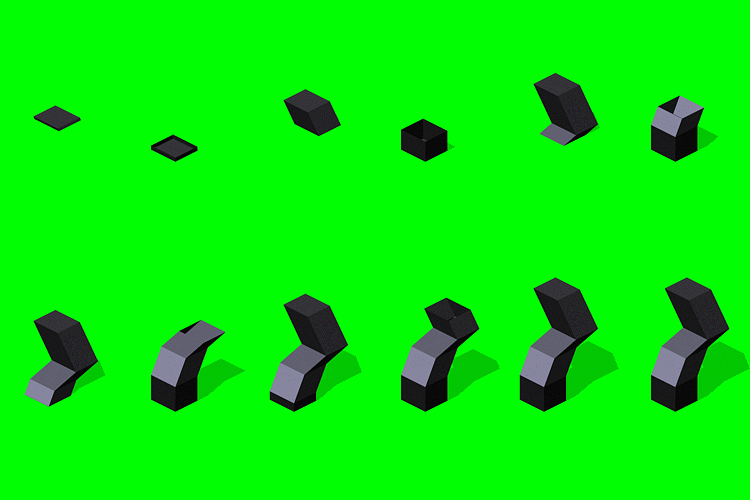
Avoid the "raise complete model out of the ground" anims. A building is not build with the roof first and then raised with stuff put under the roof.
left is bad and like yours
right is how a buildup should look like
in 3dsmax you can use a slice-plane and remove everything above it, then just move the slice plane upwards to really have the building build from ground up
A similar technique is surely also in Blender available.
Darkstorm wrote:
It did appear to be the material. I adjusted down the Specular settings on the material of the tank and icosphere and on the barracks.
You removed Specular completely and thus removed any nice light effect.
Keep a certain Specular level but make the area wider, so it's not producing a pin point sharp reflection on only a very small point. Make it a soft reflection over a wider area.
Currently your models lack depth due to the simple/bad lighting effects. _________________ SHP Artist of Twisted Insurrection: Nod buildings
In Blender you can use Boolean modifier to make similar effect as LKO demonstrated.
At first you add that modifier then you change the Operation to Difference. Then you create a box that covers the whole model in another layer. Select that box in the Boolean modifier. Now you just need to animate the box.
Hint: You can use custom shapes to make the boolean effect you want. QUICK_EDIT
Barracks could use some internal things, like cots or beds and stuff to make things a little more realistic than a big empty metal cylinder. Just a suggestion. _________________ "Don't beg for things; Do it yourself or you'll never get anything." QUICK_EDIT
Joined: 09 Mar 2008 Location: Osaka (JP)/Hong Kong/Germany
Posted: Fri Mar 18, 2016 8:49 pm Post subject:
Please don't actually use this (not that it would be tempting to use anyways, given the resolution and distortion...). The image was obtained via Google. It should just serve as an inspiration of what kind of designs you could consider, and what their impact would be. Imagine the bushels in the background as chunks of Tiberium (a la the avatar of the poster above me) and perhaps a greenish tint to the sky...
l600s21_156.png
Description:
Filesize:
739.36 KB
Viewed:
7558 Time(s)
_________________
Mao Zedong wrote:
Our mission, unfinished, may take a thousand years.
-render them as a sequence of PNG files
filename xxxx.png (xxxx being a number starting from 0000)
-open SHP Builder
-File/Import/Image->SHP
-Browse to the image sequence
-go to the Colours tab and select the right palette
-click ok and let it import the sequence
-then do a few quick adjustments
--correct the shadow color if its wrong
--reduce the canvas size to a good size
--fix some bad converted colors
-save SHP
For the import i would suggest creating and using a custom palette with OS Pal Editor, which reduces the chance of getting bad converted colors.
e.g. create a palette with a purple remap range and then use purple in your models. This way you can have red non-remap pixel as well as remap pixel.
from the custom palette you should also make all colors 2-15, 240-255 green, so they don't get used (e.g. you don't want random glowing pixel in your SHP)
btw, the game is hardcoded to work best with exactly 25 frames for the buildup anim (50 frames with shadow)
Lower or higher number of frames cause graphical glitches. _________________ SHP Artist of Twisted Insurrection: Nod buildings
since animations bring a building really to live, you should try to add one as often as possible.
e.g. on the guard tower you could create a turret animation, showing a small MG in the tower.
oh and don't forget the damage frames (something which i personally hate to create) _________________ SHP Artist of Twisted Insurrection: Nod buildings
You cannot post new topics in this forum You cannot reply to topics in this forum You cannot edit your posts in this forum You cannot delete your posts in this forum You cannot vote in polls in this forum You cannot attach files in this forum You can download files in this forum


 Darkstorm's Graphics Thread





 .
.




 (something which i personally hate to create)


