Open Source SHP Builder 3.35 Released!


It was originally suposed to be a simple patch to fix administrative problems with windows and add dithering (that Stucuk did back in october). Then, I had an idea to add a simple surprise feature.... why not play with the SHP (TD) format? The simple surprise feature has turned to be very complicated, because the whole program needed to be adapted to the TD and RA1 needs. Different palettes, different shadows, different remmapables and cameos are different. I've started to mess so much with the program that somethings were added, in an accident... also for the sake of the fun, like a so much requested GIF support that was planned for 3.5. This version growed much more than the original 3.4 beta that is still resting here that I've imported the whole redo system from it just to make it import in an existing SHP document.
In the end, the mess was done and there were a lot of things to fix. Thanks to the beta testers, I'm sure the vast majority of the problems is gone and this version became much more stable than the previous one, even with the abuse of the new features.
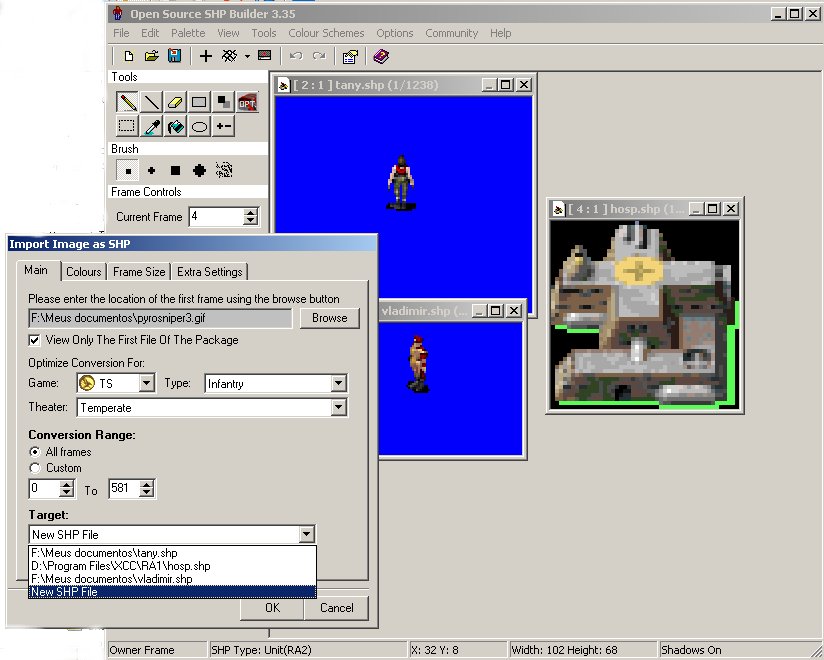
So, I have the pleasure to add you, the latest version of the OS SHP Builder, the first SHP editor for Tiberian Dawn and Red Alert 1, ever (and it still edits TS and RA2 too). Now, also with GIF, TGA and PNG support. Also, the Import has been pratically re-designed with inumerous new features. It also has a lot of other cool features and bug fixed. I guess I'll let the changelog speak for itself:
3.35
- Revisions by Banshee, with a big contribution from Stucuk.
- Added: SHP (TD) Support! You'll now be able to load and save SHP files from Tiberian Dawn and Red Alert 1 straight into your SHP Builder.
- Added: GIF, TGA and PNG file support for Import and Cameo Generator.
- Added: You can now export your SHP as GIF, TGA, PCX and PNG. Sequence can also be exported on these formats. GIF can be exported with shadows merged or not, zoom from 1 to 4, with loops and few other customizations.
- Added: Exporting as GIF allows you to preview your SHP with or without shadows or with shadows merged to the original picture and using transparency.
- Added: AutoSelect Background options. Due to the GIF and PNG support, you can now choose if the autoselect mode gets the transparent colour of the image or the first pixel. Most of the times, the result will be the same.
- Added: Dithering. You can now import images with dithering effect, although it's not enabled by default.
- Added: Aditional resources, palettes and maybe custom schemes, due to the SHP (TD) support.
- Added: Cameo Generator has been improved allowing users to generate cameos in TD and RA1 style. It also allows users to choose the buttonize, including two new ones like TD Bevel and RA1 Bevel.
- Added: Smarter SHP detection system (note: smarter than the previous, but very far from being perfect.). It detects game and type of SHP choosing the correct palette and settings for it.
- Added: Wider range of SHP extensions when opening files.
- Added: Wider set of palettes to choose for opening SHP files at Preferences.
- Added: User may now setup which game and type of SHP that will be made when a new SHP is started: TD, RA1, TS or RA2. This will affect the initial palette choosen by the program and how it will save the file.
- Added: Users may now choose the palette and determine the kind of SHP on the import.
- Added: Users are now able to import images into existing SHPs, in a frame determined by the user.
- Added: Split Shadows on Import. Users are now able to split the imported set of pictures to import the normal frames in a specified location and the shadow frames in the 'shadow related' frames of the existing SHP.
- Added: Convert shadows tool. You can now easily convert shadows from TS to RA2 and from RA2 to TS. Shadows from TD and RA1 seems to work similar to the TS ones.
- Added: The ammount of zoom is now variable, dependent on the size image.
- Updated: The Preferences now has cancel and reset to defaults options.
- Updated: Now 3D RGB Full Difference is the default CCM of the program, since it's the same algorithm used in almost all other programs like XCC Mixer and Photoshop.
- Updated: There were several interface updates, including some spelling fixes.
- Bug Fix: The 'z' on cameo generator has the correct colours now.
- Bug Fix: You'll no longer get 'Unable To Set Data For "' bug at Preferences if you are not using an administrative account.
- Bug Fix: Some flaws from the MDI system has been fixed. This should improve program's stability.
- Bug Fix: Invalid SHP (TS) files no longer leave opened files or memory leak.
- Bug Fix: Undo system imported from 3.4. Program no longer crashes if the frame the user was browsing disappears during an undo operation.
- Bug Fix: Import will no longer set frames to go from frame 0 to -1.
- Bug Fix: Import will no longer give access violations messages due to custom intervals of frames.
- Bug Fix: Sequence Maker option at Preferences will now display properly (thanks Stucuk).
- Bug Fix: Preview will now preview the last frame properly, specially when the last frame is the first and only frame (like in cameos).
- Bug Fix: RGB Advanced Difference no longer cause invalid floating point operations.
- Bug Fix: Building Tools is undone correctly on all situations, even if you move the mouse when dropping the left button.
- Bug Fix: Image Effects now refresh your editing window when applied.
- Bug Fix: Cameo Generator and Colour Replacement will ignore selections with one pixel.
I recommend everyone to update your OS SHP Builder for this version. You can download it HERE. Support for this tool is available at HERE.
If you have a site, feel free to mirror it without asking for permision. You can also play with its source code and add your own features on the program. Just credit myself and Stucuk for the program. Enjoy it!


 )
)