Posted: Mon May 29, 2006 9:59 pm Post subject:
looking for a normalizeasion tutorial
as the title says, i need a tut on how to make normals, i just dont get how they work, and the dang cubed normiliser sucks for my vxl so i cant use that _________________ Global Genocide Website Last edited by THE Protagonist on Mon May 29, 2006 10:47 pm; edited 1 time in total QUICK_EDIT
Joined: 07 Mar 2006 Location: In ur BIOS, Steeln ur Megahurtz!
Posted: Tue May 30, 2006 4:28 pm Post subject:
its crap. too many strange shapes. try to make it square (wow, first time to say something like that, most n00bs make em too square) _________________ Please, read the signature rules of the forum. QUICK_EDIT
aww fck i dont want to make it boxy, my side is about curvs and smothness well im gonna remake it to make it work. *sigh* this sucks, i dont waant to change it, i liked it _________________ Global Genocide Website QUICK_EDIT
omg i found how to fix it by adding more inner vxls on the edges then yousing the cubed normilisers
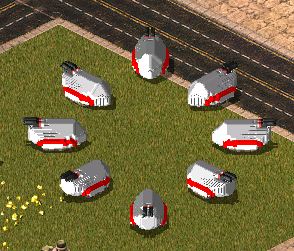
[UPDATE] here is a pic of my work in progress you can see the difference easaly
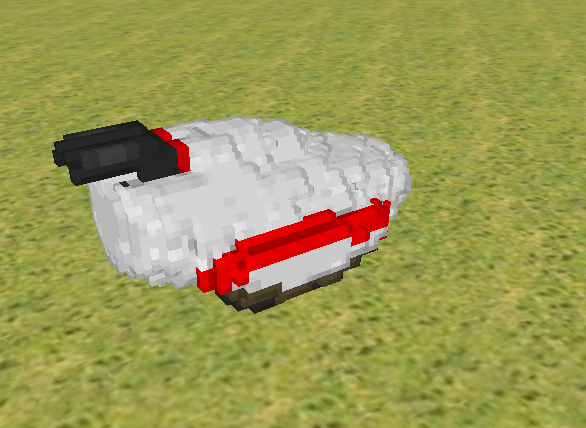
[UPDATE2] i got the sides mostly done, just thought i would give you a better preview of what it will look like
I can't fix your voxel, but I can tell you EXACTLY why cubed normals failed to produce a good result on it.
You doubled the size in Wills or maybe OS VXL editor it loosk like. I don't mean by bounds, but this is literally made by 2x2 squares instead of individual voxels.
Now, when you applied cubed normals, you should fill in every gap INSIDE the voxel first because it works based of the cubes of the vectors between each and every individual voxel. Failure to make the unit 'solid' will result in cubed normals providing shit.
You can remove the excess voxels in the same menu as autonormals after cubed normals are applied, or just leave it. Full voxels have no noticable effect on performance... even on low end systems (like mine).
Now, since you're voxel is made of 2x2 cubes cubed normals works hard to highlight those small edges. In short, your voxel doesn't appear smooth because the autonormals does an accurate job. The voxel ISN'T smooth.
So again, no real way to say this one, just a few pointers for your next voxel. _________________ QUICK_EDIT
You cannot post new topics in this forum You cannot reply to topics in this forum You cannot edit your posts in this forum You cannot delete your posts in this forum You cannot vote in polls in this forum You cannot attach files in this forum You can download files in this forum


 looking for a normalizeasion tutorial





 well im gonna remake it to make it work. *sigh* this sucks, i dont waant to change it, i liked it
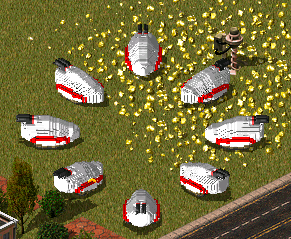

 well thats the smothest i can get it so that means its finaly done!