


 Voxel Section Editor III 1.36 released!


For this reason, I'd like to present the new Auto Normals 7.0:
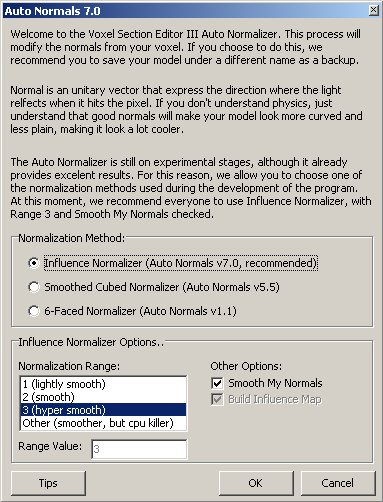
So, that's it. Now, it's up to you to choose the way you want to normalize your voxels. However, there is also an inovation included. The normalization range heavly affects the results of the normalizations. The previous versions used range 1, but if you use range 2, 3 or even 4, you'll notice much better and smoothed results. Use more than that, and your voxel will get crystalized or even cartoonish. I've once tested using range 30 here. The result was totally awful and it took 20 minutes to normalize the voxel.
Anyway, I'm sure it won't be easy to digest all these options, so I've created a tutorial with normalizing tips. You can also reach this link by clicking in the tips button.
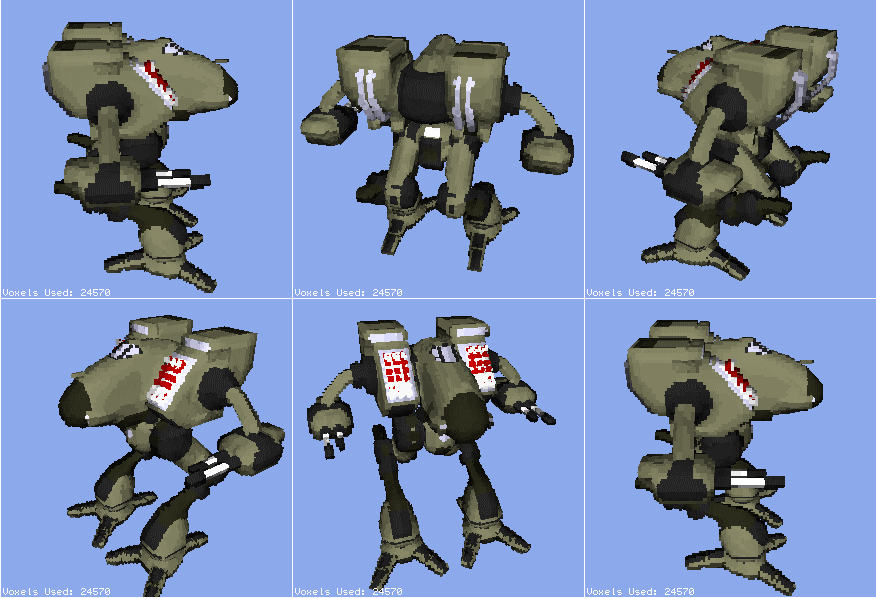
With a good use of the normalization options, you can get results like this (click in the picture for a 360' rotation), which is much better than what any previous version could get with the Mad Dog:
Voxel Section Editor III 1.36 also allows you to take PNG, JPG and even bitmap screenshots. Here's the changelog:
1.36
- revisions by Banshee
- Added: New Auto Normals 7.0 is now available. Users are able to customize the normalizing methods and the procedures done during the operation, as well as the range of normalization and smooth process. You can also use the old 6-Faced normalizer from VXLSE III 1.2c again.
- Added: The new 3D preview window now exports screenshots as PNG, JPG and Bitmap..
- Bug Fix: The screenshot feature from the new 3d preview window will no longer distort colours under certain sizes.
- Bug Fix: The chances of a access violation if you close the program before the 3d preview window are no more.
Support for this tool is available at the phenominally freaktastically totally uber awesomely popular Voxel Section Editor III forum of the doom (guest posting allowed).
The Help file isn't being updated because I don't have its source (Stucuk may have it). So, the help is pretty much outdated.
You can download it HERE. If you own a fan site, you can place this program on your site for download. If you wanna modify it, go ahead. But on both cases, make sure that Will, Plasmadroid, Koen, Stucuk and I are credited for our efforts. And, have fun voxelling!


 .
.


 (if says mobile, talk anyway)





