:: Home :: Get Hosted :: PPM FAQ :: Forum FAQ :: Privacy Policy :: Search :: Memberlist :: Usergroups :: Register :: Profile :: Log in to check your private messages :: Log in ::

Do you want to advertise at Project Perfect Mod. Find out how to do it HERE.

The time now is Sat Jul 24, 2021 12:45 am
All times are UTC + 0
 Forum index » PPM Zone » PPM News Network
OS BIG Editor 0.5 Released!
Moderators: Global Moderators
Post new topic   Reply to topic Page 1 of 1 [1 Post] Mark the topic unread ::  View previous topic :: View next topic
Author Message
Banshee
Supreme Banshee


Joined: 15 Aug 2002
Location: Brazil

PostPosted: Fri Mar 09, 2007 4:51 am    Post subject:  OS BIG Editor 0.5 Released!
Subject description: Now it's easier and quicker to preview and extract your C&C3 files.
Reply with quote  Mark this post and the followings unread

Hello ladies and gentlemen! After a whole day of work, I'm releasing a new version of the OS BIG Editor, an open source tool to browse .BIG files from C&C* and BfME games and extract its files. Future versions of the program will be able to edit and create these .BIG files as well, which is why it is called OS BIG Editor (and not Viewer).


The version 0.5 comes to improve the interface and make the program even more useful. Thanks for the contribution of Danny van Loon and Zlatko Minev, I could quickly add TGA preview support and drag and dropp support for the program. You can now extract files by drag and dropping them into windows explorer. Or load .BIG files clicked or drag and dropped from windows explorer. There are also other interesting minor features included like the ability to use word wrap when browsing text files and saving the file with its directory or just the filename...

Here's a screenshot and the changelog:
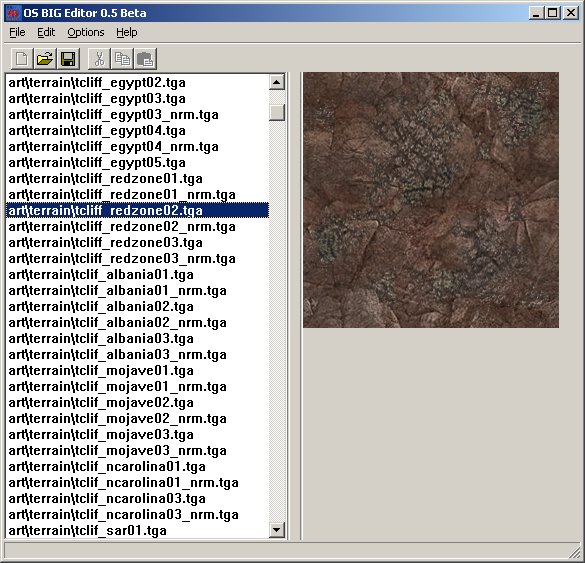


OS BIG Editor 0.5
- revisions by Banshee:
- Added: Associate .big files with OS BIG Editor at Options -> Preferences (Note: the second and third icons were made by Danny van Loon).
- Added: Preview your TGA files in the program (done by Zlatko Minev and, its interface.was improved by Banshee)
- Added: Extract your files by dragging and dropping them to windows explorer.
- Added: Drag your .BIG files by from windows explorer and open them by dropping them into the program (coded by Danny van Loon).
- Added: New quick options available: Cut Image Preview, Word Wrap and Save Full Directory When Extracting.
- Added: Program settings and latest opened directories are saved in a options file.
- Updated: Program icon and some graphics were updated. They still look stupid.
- Updated: Update Me now links a different section of PPM totally dedicated to display information about the program and download link of the latest version.


Support for this tool is available at the CnC Editing Tools forum (guest posting allowed).

You can download it HERE. If you own a fan site, you can place this program on your site for download. If you wanna modify it, go ahead. But on both cases, make sure that I am credited for my efforts and that jonwil is credited for his RefPack Decompression code used in the program. Have fun!


* Renegade, Generals and Command & Conquer 3 Tiberium Wars.

Back to top
View user's profile Send private message Visit poster's website Skype Account
Display posts from previous:   
Post new topic   Reply to topic Page 1 of 1 [1 Post] Mark the topic unread ::  View previous topic :: View next topic
 Forum index » PPM Zone » PPM News Network
Jump to:  
Share on TwitterShare on FacebookShare on Google+Share on DiggShare on RedditShare on PInterestShare on Del.icio.usShare on Stumble Upon
Quick Reply
Username:


If you are visually impaired or cannot otherwise answer the challenges below please contact the Administrator for help.


Write only two of the following words separated by a sharp: Brotherhood, unity, peace! 

 
You cannot post new topics in this forum
You can reply to topics in this forum
You cannot edit your posts in this forum
You cannot delete your posts in this forum
You cannot vote in polls in this forum
You cannot attach files in this forum
You can download files in this forum


Powered by phpBB © phpBB Group

[ Time: 0.1501s ][ Queries: 12 (0.0074s) ][ Debug on ]