


 OS BIG Editor 0.5 Released!


The version 0.5 comes to improve the interface and make the program even more useful. Thanks for the contribution of Danny van Loon and Zlatko Minev, I could quickly add TGA preview support and drag and dropp support for the program. You can now extract files by drag and dropping them into windows explorer. Or load .BIG files clicked or drag and dropped from windows explorer. There are also other interesting minor features included like the ability to use word wrap when browsing text files and saving the file with its directory or just the filename...
Here's a screenshot and the changelog:
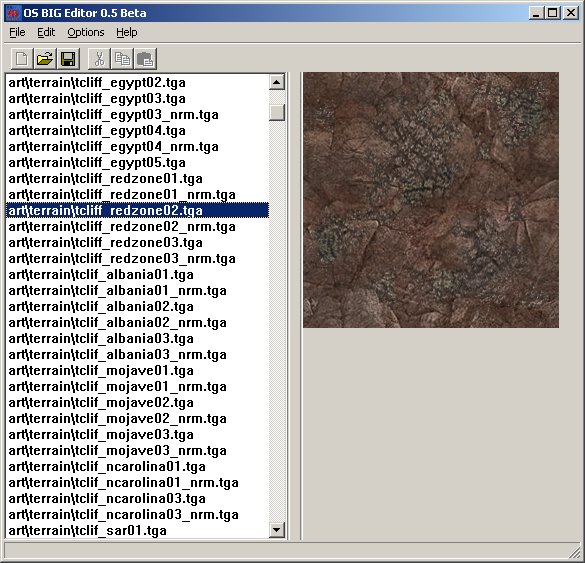
OS BIG Editor 0.5
- revisions by Banshee:
- Added: Associate .big files with OS BIG Editor at Options -> Preferences (Note: the second and third icons were made by Danny van Loon).
- Added: Preview your TGA files in the program (done by Zlatko Minev and, its interface.was improved by Banshee)
- Added: Extract your files by dragging and dropping them to windows explorer.
- Added: Drag your .BIG files by from windows explorer and open them by dropping them into the program (coded by Danny van Loon).
- Added: New quick options available: Cut Image Preview, Word Wrap and Save Full Directory When Extracting.
- Added: Program settings and latest opened directories are saved in a options file.
- Updated: Program icon and some graphics were updated. They still look stupid.
- Updated: Update Me now links a different section of PPM totally dedicated to display information about the program and download link of the latest version.
Support for this tool is available at the CnC Editing Tools forum (guest posting allowed).
You can download it HERE. If you own a fan site, you can place this program on your site for download. If you wanna modify it, go ahead. But on both cases, make sure that I am credited for my efforts and that jonwil is credited for his RefPack Decompression code used in the program. Have fun!
* Renegade, Generals and Command & Conquer 3 Tiberium Wars.


