Project Perfect Mod Forums
:: Home :: Get Hosted :: PPM FAQ :: Forum FAQ :: Privacy Policy :: Search :: Memberlist :: Usergroups :: Register :: Profile :: Log in to check your private messages :: Log in ::


The time now is Tue Nov 24, 2026 5:39 am
All times are UTC + 0
More 3dsMax problems, again
Moderators: Global Moderators, Media Hut Moderators, Red Alert 2 Moderators, Tiberian Sun Moderators
Post new topic   Reply to topic Page 1 of 1 [20 Posts] Mark the topic unread ::  View previous topic :: View next topic
Author Message
Cranium
Defense Minister


Joined: 05 Dec 2009
Location: USA

PostPosted: Fri Feb 05, 2010 11:51 pm    Post subject:  More 3dsMax problems, again Reply with quote  Mark this post and the followings unread

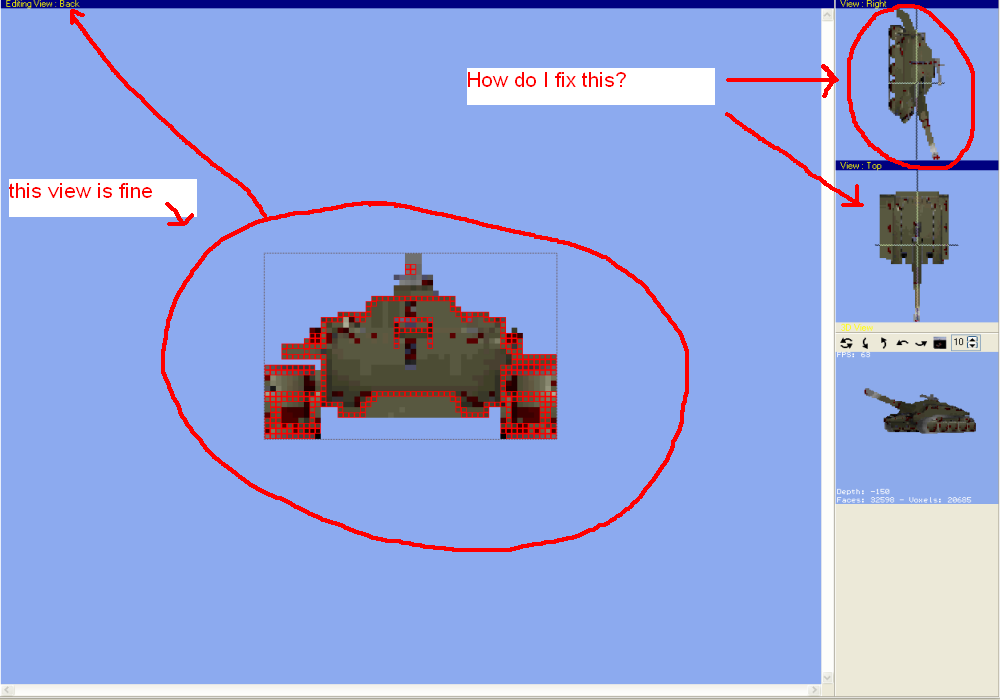
I havent experienced this problem before, And really havent a clue on how to fix it. I tried rotating to different angles, as I fix one angle another gets muffed, what to do?


Image1111.png
 Description:
 Filesize:  74.16 KB
 Viewed:  4996 Time(s)

Image1111.png


_________________

The enemy shall be injected with toxic poison - Venom

Back to top
View user's profile Send private message Visit poster's website Skype Account
ZoidZilla
Shrapnel Sniper


Joined: 16 Apr 2008

PostPosted: Sat Feb 06, 2010 1:46 am    Post subject: Reply with quote  Mark this post and the followings unread

Hmm, you can either try to rotate it in max and convert it again until you have the right position or you swap the angles with 3DS2VXL.

_________________
Tiberian Fall
The Art Of Tiberian Fall

Back to top
View user's profile Send private message Skype Account
Tony
Commander


Joined: 02 Apr 2005
Location: United States

PostPosted: Sat Feb 06, 2010 9:39 am    Post subject: Reply with quote  Mark this post and the followings unread

there are two ways to fix this, one is to adjust your 3ds2vxl settings, the other is to fix the model itself.

How to fix the model:

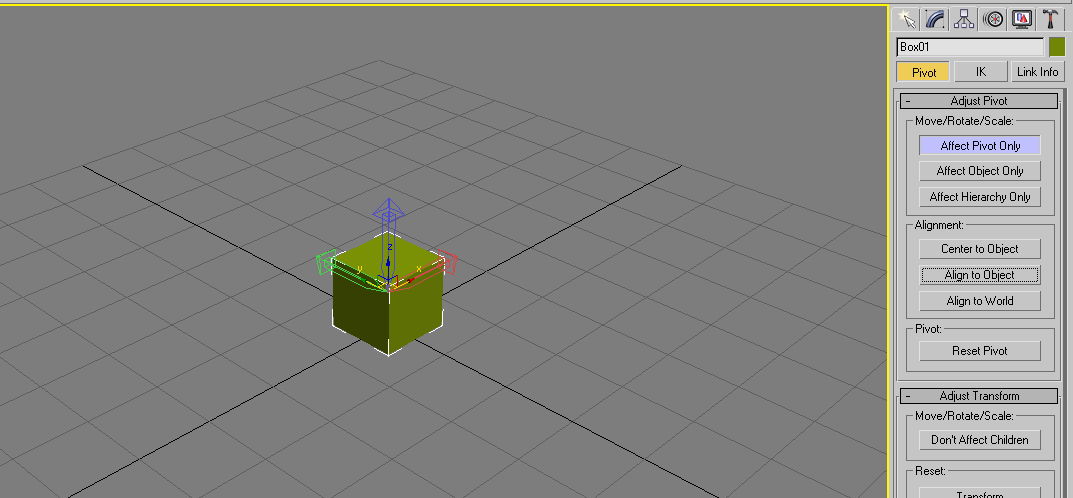
In 3dsMax make sure that the model is facing tracks down on the home grid in "perspective" view, go to Hierarchy>Pivot> select effect pivot only, then Center to object, and finally.. align to object.

(if you have an object with multiple parts, sometimes it can become more complicated.. I wont go into that)

everything should look like the pic below.


Untitled.png
 Description:
 Filesize:  40.45 KB
 Viewed:  4964 Time(s)

Untitled.png


Back to top
View user's profile Send private message Skype Account
Cranium
Defense Minister


Joined: 05 Dec 2009
Location: USA

PostPosted: Sat Feb 06, 2010 5:04 pm    Post subject: Reply with quote  Mark this post and the followings unread

thanks guys, I'm still having trouble with this darn thing, I cant seem to get it right for some reason. My previous attempts at converting 3ds to vxl have worked fine, but all of a sudden it's being stubborn. Mad

@Tony, yea, thats usually how I align it, but not working this time. I dont know what the phooey is going on.

_________________

The enemy shall be injected with toxic poison - Venom

Back to top
View user's profile Send private message Visit poster's website Skype Account
ZoidZilla
Shrapnel Sniper


Joined: 16 Apr 2008

PostPosted: Sat Feb 06, 2010 8:37 pm    Post subject: Reply with quote  Mark this post and the followings unread

If you send me the file via PM, I will have a look. Maybe I can find whats wrong with it.

_________________
Tiberian Fall
The Art Of Tiberian Fall

Back to top
View user's profile Send private message Skype Account
ViPr
Gauss Rifle Trooper


Joined: 30 Dec 2004

PostPosted: Sun Feb 07, 2010 10:56 am    Post subject: Reply with quote  Mark this post and the followings unread

don't screw around with moving only the pivots, that causes a bug in 3ds2vxl. maybe that's the problem but i can't remember very well. anyway try resetting the pivots and instead move the whole meshes and move all the vertices around instead of the pivots by themselves to get the pivots where you want them relative to the meshes.

Back to top
View user's profile Send private message
ZoidZilla
Shrapnel Sniper


Joined: 16 Apr 2008

PostPosted: Sun Feb 07, 2010 12:14 pm    Post subject: Reply with quote  Mark this post and the followings unread

If its really a pivot-problem it is easy to fix.

Just create a new box in the center of tank-hull. Covert the box into a editable poly, select all faces of the box and attach your model to it. Delete all faces of the box. Done. Now you have a new undeformed pivot for your model. If the tank has a turret, repeat the procedure for the turret as it need its own pivot.
Do not scale or deform you model after that or you have to redo the entire procedure.

_________________
Tiberian Fall
The Art Of Tiberian Fall

Back to top
View user's profile Send private message Skype Account
Cranium
Defense Minister


Joined: 05 Dec 2009
Location: USA

PostPosted: Sun Feb 07, 2010 2:08 pm    Post subject: Reply with quote  Mark this post and the followings unread

I will try both way's,after 22 attempts with still wrong angles I kinda gave up, but I will try again. Thanks guys for all the help.

_________________

The enemy shall be injected with toxic poison - Venom

Back to top
View user's profile Send private message Visit poster's website Skype Account
Cranium
Defense Minister


Joined: 05 Dec 2009
Location: USA

PostPosted: Thu Feb 11, 2010 3:24 am    Post subject: Reply with quote  Mark this post and the followings unread

Another problem with 3dsMax..... Mad

I'm pretty sure what I'm doing is wrong, because it's not working Razz But how do I get 2 pieces welded together to make one? I selected the 2 pieces and chose edit poly, attach, then used the welder, welded normals as well as the vertices, but still 2 pieces. What to do? Crying or Very sad

_________________

The enemy shall be injected with toxic poison - Venom

Back to top
View user's profile Send private message Visit poster's website Skype Account
MadHQ
Commander


Joined: 07 Nov 2003

PostPosted: Thu Feb 11, 2010 5:33 am    Post subject: Reply with quote  Mark this post and the followings unread

If your still having problems with the 3ds2vxl conversion post the 3ds file and I will have look at it.

As for "welding"... It depends on what you mean by that and what your trying to do. Instead of asking questions like this try asking Google! This is a video tutorial on that subject.

http://www.youtube.com/watch?v=hal8iiWH5zY

_________________
MadHQ's Graveyard - Click here!
(Permissions) - (F.A.Q.)

Back to top
View user's profile Send private message Skype Account
Cranium
Defense Minister


Joined: 05 Dec 2009
Location: USA

PostPosted: Thu Feb 11, 2010 8:24 pm    Post subject: Reply with quote  Mark this post and the followings unread

Most times, not all the time I search for help elsewhere first, like for this situation, I looked at several ways people said how to do it, but didnt work for me, thus why I asked here now.

Yes I am still having trouble getting this 3ds file to have correct angles, I pretty much gave up, but here's the file. If you could fix it, it would be great.


bdtank.rar
 Description:

Download
 Filename:  bdtank.rar
 Filesize:  100.06 KB
 Downloaded:  148 Time(s)


_________________

The enemy shall be injected with toxic poison - Venom

Back to top
View user's profile Send private message Visit poster's website Skype Account
ZoidZilla
Shrapnel Sniper


Joined: 16 Apr 2008

PostPosted: Thu Feb 11, 2010 8:55 pm    Post subject: Reply with quote  Mark this post and the followings unread

hmm the max file would be better.

Edit:
I have checked it, you must attach everything to one single part and If your vehicle has a turret, the turret must be his own part. You should also name the turret-part "turret" in 3ds max. The units pivot should be always in the center of mass and the unit should be located at 0,0,0 in your max scene.

I attached everything and rotated it to the correct direction:


cramtank.3DS
 Description:

Download
 Filename:  cramtank.3DS
 Filesize:  609.78 KB
 Downloaded:  132 Time(s)


_________________
Tiberian Fall
The Art Of Tiberian Fall

Back to top
View user's profile Send private message Skype Account
Cranium
Defense Minister


Joined: 05 Dec 2009
Location: USA

PostPosted: Thu Feb 11, 2010 9:47 pm    Post subject: Reply with quote  Mark this post and the followings unread

OK I'll check it out. Thanks ZoidZilla.

_________________

The enemy shall be injected with toxic poison - Venom

Back to top
View user's profile Send private message Visit poster's website Skype Account
Cranium
Defense Minister


Joined: 05 Dec 2009
Location: USA

PostPosted: Thu Feb 11, 2010 10:19 pm    Post subject: Reply with quote  Mark this post and the followings unread

Frickin, Frack,and Phooey... Very Happy It's still not correct Sad I'm adding the Max file, so maybe that will help.


DemoTank.rar
 Description:

Download
 Filename:  DemoTank.rar
 Filesize:  114.49 KB
 Downloaded:  149 Time(s)


_________________

The enemy shall be injected with toxic poison - Venom

Back to top
View user's profile Send private message Visit poster's website Skype Account
ZoidZilla
Shrapnel Sniper


Joined: 16 Apr 2008

PostPosted: Fri Feb 12, 2010 12:33 am    Post subject: Reply with quote  Mark this post and the followings unread

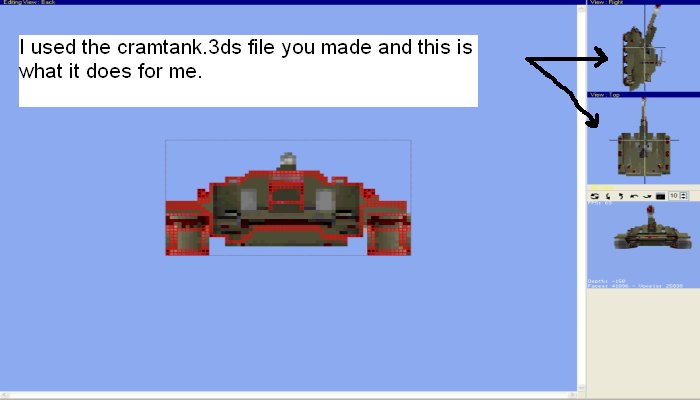
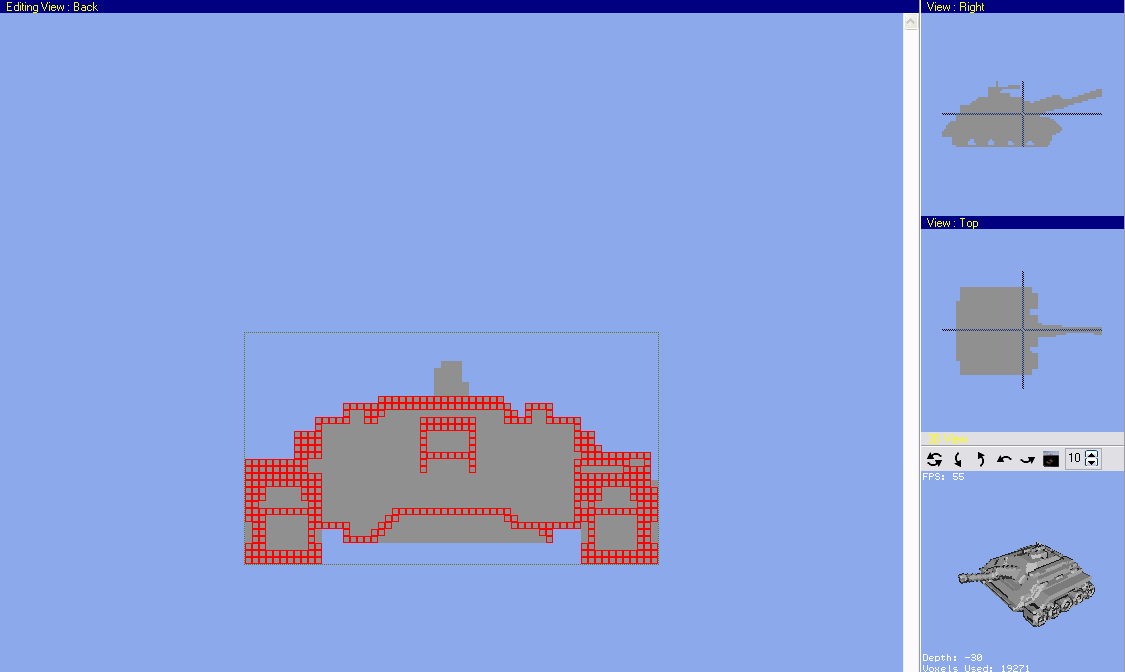
Hmm, I converted that 3ds I have given to you and it was correct, I still have that voxel. Without textures of course. Maybe your 3ds2vxl settings are wrong.


capture_12022010_012802.png
 Description:
 Filesize:  17.1 KB
 Viewed:  4795 Time(s)

capture_12022010_012802.png


_________________
Tiberian Fall
The Art Of Tiberian Fall

Back to top
View user's profile Send private message Skype Account
Cranium
Defense Minister


Joined: 05 Dec 2009
Location: USA

PostPosted: Fri Feb 12, 2010 12:52 am    Post subject: Reply with quote  Mark this post and the followings unread

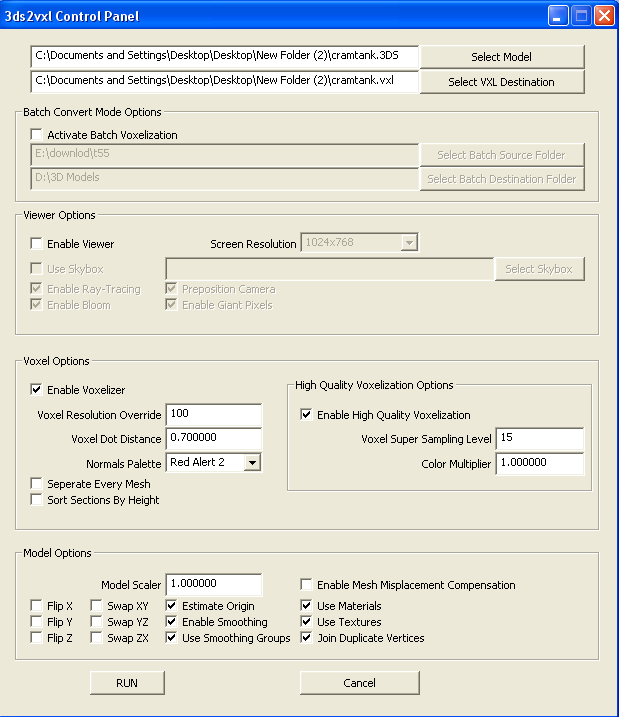
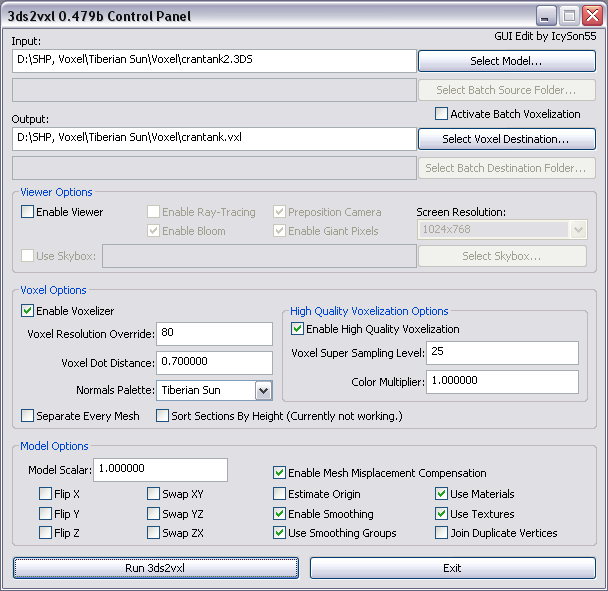
lol, Well I dont know what the hell I'm doing then, cause it refuses to cooperate for me, here is my 3ds2vxl setting page, let me know if settings are correct o.k.?


Image201.png
 Description:
 Filesize:  22.9 KB
 Viewed:  4789 Time(s)

Image201.png


Image200.png
 Description:
 Filesize:  51.99 KB
 Viewed:  4789 Time(s)

Image200.png


_________________

The enemy shall be injected with toxic poison - Venom

Back to top
View user's profile Send private message Visit poster's website Skype Account
ZoidZilla
Shrapnel Sniper


Joined: 16 Apr 2008

PostPosted: Fri Feb 12, 2010 1:12 am    Post subject: Reply with quote  Mark this post and the followings unread

Here the revised file and my settings. Try them.

For "Voxel Super Sampling Level" (Higher means better quality and longer conversion time) and "Voxel Resolution Override" (Higher settings, larger voxel) you can use any settings you want.

Some hints:
-You don't need to use the "editable mesh" or "editable poly" modifier. Just right click on an object --> convert to: --> editable poly. easier and less complicated.
-Shorten your texture names, 8 character is enough, the names will be clipped anyway if you convert to 3ds.


capture_12022010_015622.png
 Description:
 Filesize:  23.55 KB
 Viewed:  4783 Time(s)

capture_12022010_015622.png


DemoTank.rar
 Description:

Download
 Filename:  DemoTank.rar
 Filesize:  319.07 KB
 Downloaded:  151 Time(s)


_________________
Tiberian Fall
The Art Of Tiberian Fall

Back to top
View user's profile Send private message Skype Account
Cranium
Defense Minister


Joined: 05 Dec 2009
Location: USA

PostPosted: Fri Feb 12, 2010 3:05 am    Post subject: Reply with quote  Mark this post and the followings unread

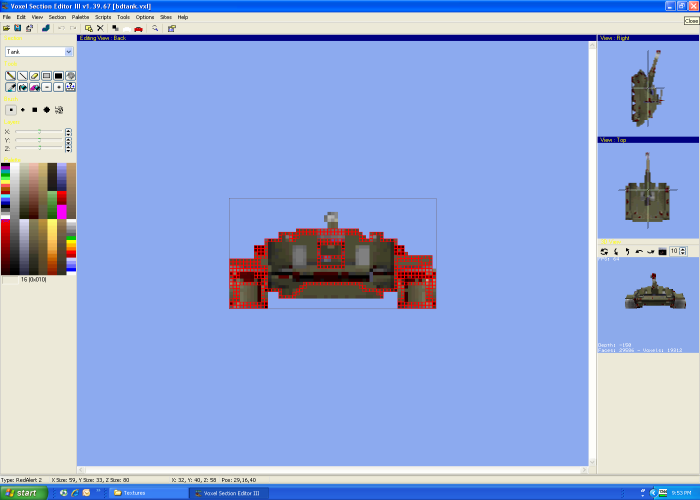
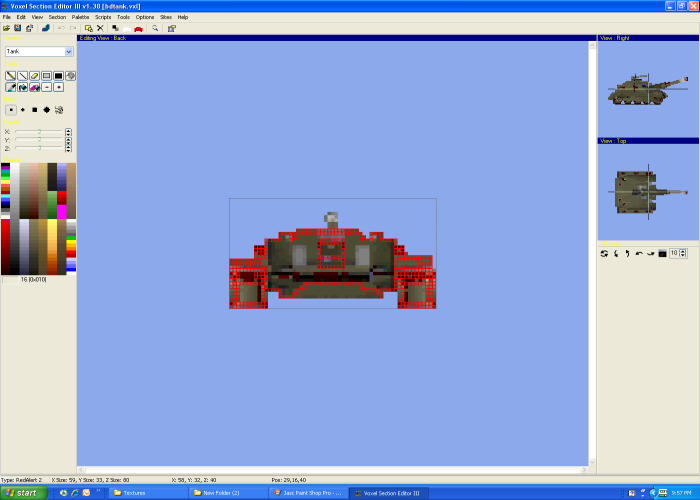
Finally figured out the madness, For some strange reason using Banshee's new vxlse III w/ 3ds2vxl import function, it screws the images up (pic1) and even though it shows them in the wrong angle they actually are correct. You have to shut down the vxlseIII program after it converts and then just double click the new voxel and then vxlseIII will finally display them correctly (pic2). So Banshee if you read this, you have a Bug.


TANK203.png
 Description:
 Filesize:  48.03 KB
 Viewed:  4774 Time(s)

TANK203.png


TANK204.png
 Description:
 Filesize:  44.56 KB
 Viewed:  4774 Time(s)

TANK204.png


_________________

The enemy shall be injected with toxic poison - Venom

Back to top
View user's profile Send private message Visit poster's website Skype Account
Banshee
Supreme Banshee


Also Known As: banshee_revora (Steam)
Joined: 15 Aug 2002
Location: Brazil

PostPosted: Fri Feb 12, 2010 3:54 am    Post subject: Reply with quote  Mark this post and the followings unread

The right views from VXLSE III are really suspicious. I'll fix them in one the next revisions.

Back to top
View user's profile Send private message Visit poster's website Skype Account
Banshee
Supreme Banshee


Also Known As: banshee_revora (Steam)
Joined: 15 Aug 2002
Location: Brazil

PostPosted: Mon Feb 15, 2010 5:06 pm    Post subject: Reply with quote  Mark this post and the followings unread


Back to top
View user's profile Send private message Visit poster's website Skype Account
Display posts from previous:   
Post new topic   Reply to topic Page 1 of 1 [20 Posts] Mark the topic unread ::  View previous topic :: View next topic
:  
Share on TwitterShare on FacebookShare on Google+Share on DiggShare on RedditShare on PInterestShare on Del.icio.usShare on Stumble Upon
You cannot post new topics in this forum
You cannot reply to topics in this forum
You cannot edit your posts in this forum
You cannot delete your posts in this forum
You cannot vote in polls in this forum
You cannot attach files in this forum
You can download files in this forum


Powered by phpBB © phpBB Group

[ Time: 0.2404s ][ Queries: 21 (0.0251s) ][ Debug on ]